Z-Image Turbo and Qwen-Image-2.1 are the two image models from Alibaba you are most likely to try in ComfyUI right now, and they are close in size: about 6B and 7B parameters in the part that draws. On a 32GB Mac they behave very differently.
I ran both on my Apple M5 MacBook Pro (32GB) with the same four prompts and the same seeds. Here is what I measured. At each model's default settings, Z-Image Turbo makes an image 3.8× faster (58 seconds against 219) and its license is Apache 2.0. Qwen-Image-2.1 is the one that spelled Korean correctly, and it has native transparency and editing, but its license does not allow commercial use of the model. So the choice depends on the license first and the task second. You cannot get Qwen's quality at Z-Image's speed by cutting Qwen's step count. I tested that too.
What is being compared
| Z-Image Turbo | Qwen-Image-2.1 | |
|---|---|---|
| Image generator | 6B, single-stream DiT (model card) | 7B, 32 single-stream DiT layers (model card) |
| Text encoder | Qwen3-4B | Qwen3-VL 8B |
| Default steps in ComfyUI | 8 (distilled "Turbo") | 25 (ComfyUI docs) |
| Transparent (RGBA) output, editing | no | native, in the same model |
| Korean text claimed | no (claims Chinese and English) | no |
| License | Apache 2.0 | Qwen Research License (non-commercial) |
Neither model card claims Korean. I tested it anyway, because a misspelled word is an objective failure.
On the license, I already read Qwen-Image-2.1's in full in my earlier measurement post. Briefly: the model may be used "for research or evaluation purposes only", commercial use of the model needs a separate agreement with Alibaba, and the text does not plainly say whether you may sell the images you make. The previous Qwen-Image releases were Apache 2.0, so if you knew those, do not assume 2.1 is the same. Z-Image Turbo is Apache 2.0 on both the official repository and Comfy-Org's packaging.
Speed: 58 seconds against 219
Each configuration made one cold image and seven warm ones at 1024 × 1024. The chart shows the warm median, and the range bar runs from the fastest warm image to the slowest.
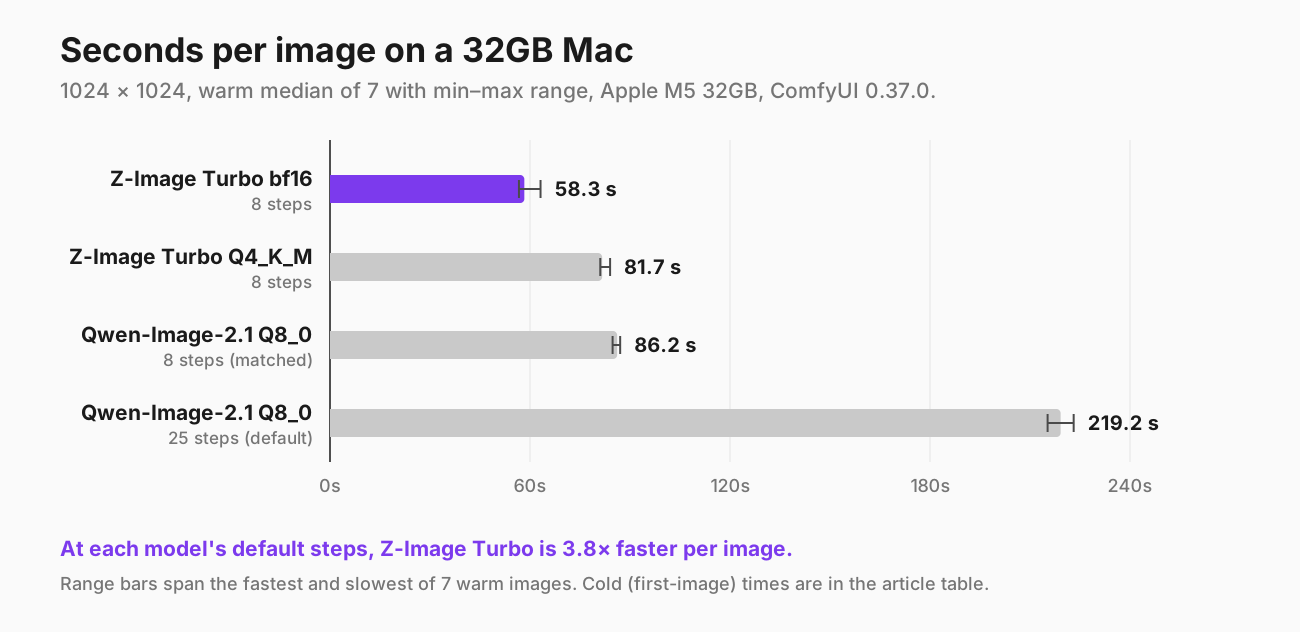
Warm median seconds per image, with the fastest and slowest of seven warm runs. Apple M5 32GB, ComfyUI 0.37.0.
| Configuration | Steps | Cold (1st image) | Warm median [min–max], n=7 | Peak memory |
|---|---|---|---|---|
| Z-Image Turbo bf16 | 8 | 97.1 s | 58.3 s [56.7–63.2] | 19 GB |
| Z-Image Turbo Q4_K_M (GGUF) | 8 | 86.2 s | 81.7 s [81.1–84.0] | 12 GB |
| Qwen-Image-2.1 Q8_0 (GGUF) | 8 | 91.6 s | 86.2 s [84.8–87.1] | 13 GB |
| Qwen-Image-2.1 Q8_0 (GGUF) | 25 | 224.7 s | 219.2 s [215.3–223.1] | 13 GB |
The warm runs are tight. Z-Image bf16 has the widest spread, 11% from fastest to slowest, and the other three stay within 4%. The one big cold penalty is Z-Image bf16. Its first image took 39 seconds longer than the warm median, which is what loading a 12GB file costs. Every other configuration loses only about 5 seconds on its first image.
Where Z-Image's lead comes from
Running Qwen at both 8 and 25 steps lets me separate its fixed cost from its per-step cost. 17 extra steps added 133 seconds, so one Qwen step costs about 7.8 seconds. That leaves about 23 seconds per image that do not depend on step count: encoding the prompt with an 8B text encoder, decoding the image, and moving weights around.
Z-Image bf16 takes 58.3 seconds for 8 steps, so its cost per step is at most 7.3 seconds, and that figure still includes its own fixed overhead. Per step, the two networks cost roughly the same on this Mac. Almost all of Z-Image's lead comes from needing 8 steps instead of 25. That is what the "Turbo" distillation buys you, and it is also why simply lowering Qwen's step count does not give you Qwen at Turbo speed. More on that below.
Memory, and why the smaller file is slower
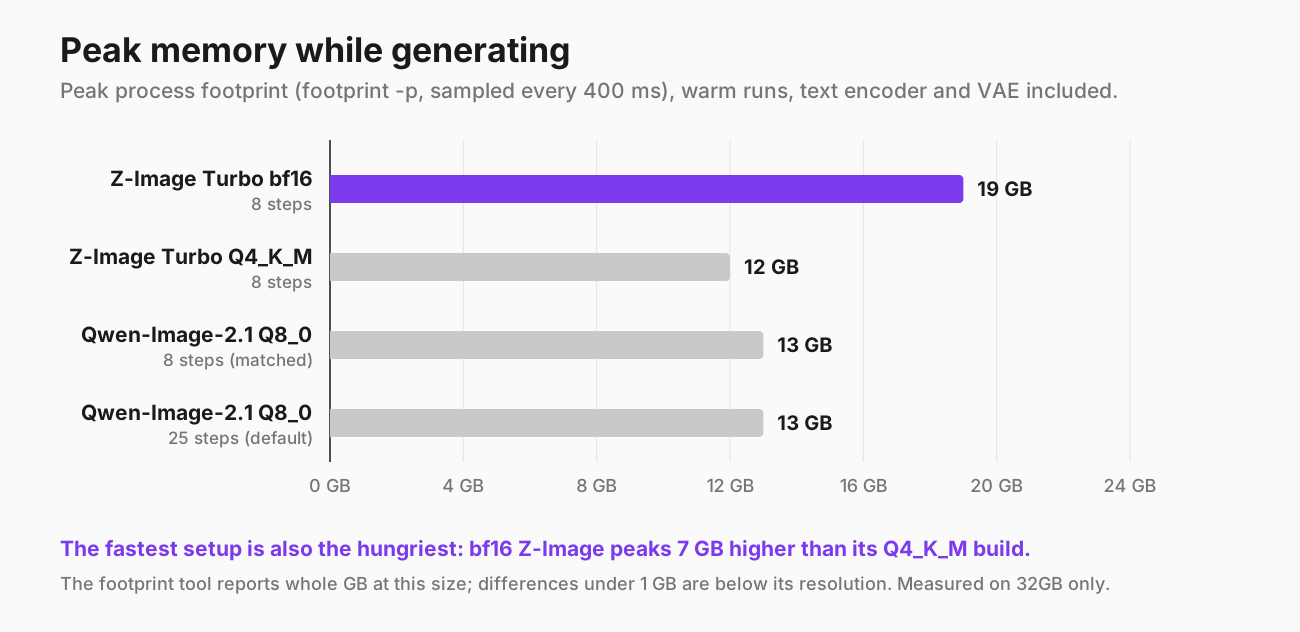
Peak process footprint while generating, text encoder and VAE included. The footprint tool reports whole gigabytes at this size.
The fastest configuration also uses the most memory. Z-Image bf16 peaked at 19GB. It holds the 11.5 GiB bf16 weights next to a 4.1 GiB text encoder, plus the working memory of generation.
The Q4_K_M quantization of Z-Image cut the peak to 12GB, and it was 40% slower (81.7 s against 58.3 s). That matches what I measured for Qwen-Image-2.1 last week, where the 8-bit GGUF beat every smaller K-quant. The explanation that fits both results is that ComfyUI-GGUF unpacks quantized weights on the fly during every step, and on Apple Silicon's MPS backend that work costs more than reading bf16 weights directly. I have not profiled it, so treat that as a hypothesis that fits the data rather than a confirmed cause.
Quantizing barely changed the pictures: same seed, same composition, small differences in detail. One difference mattered. On seed 104 the bf16 model wrote 아세리카노 and Q4_K_M wrote 아베리카노. Both are wrong, in different ways.
What this means for a 16GB Mac: I only have a 32GB machine, so this is arithmetic, not a measurement. A 19GB peak cannot fit in 16GB of RAM without heavy swapping, so on 16GB, Z-Image bf16 is probably out. Q4_K_M at 12GB and Qwen Q8_0 at 13GB leave only 3–4GB for macOS and everything else. They might run, but slowly. Z-Image's model card says it fits within 16GB of VRAM, but that refers to a GPU's dedicated memory, not a Mac's shared memory.
Text rendering: English is easy, Korean is not
I scored every text image from enlarged full-resolution crops. That mattered: at thumbnail size, one of Qwen's correct 아메리카노 looked misspelled.
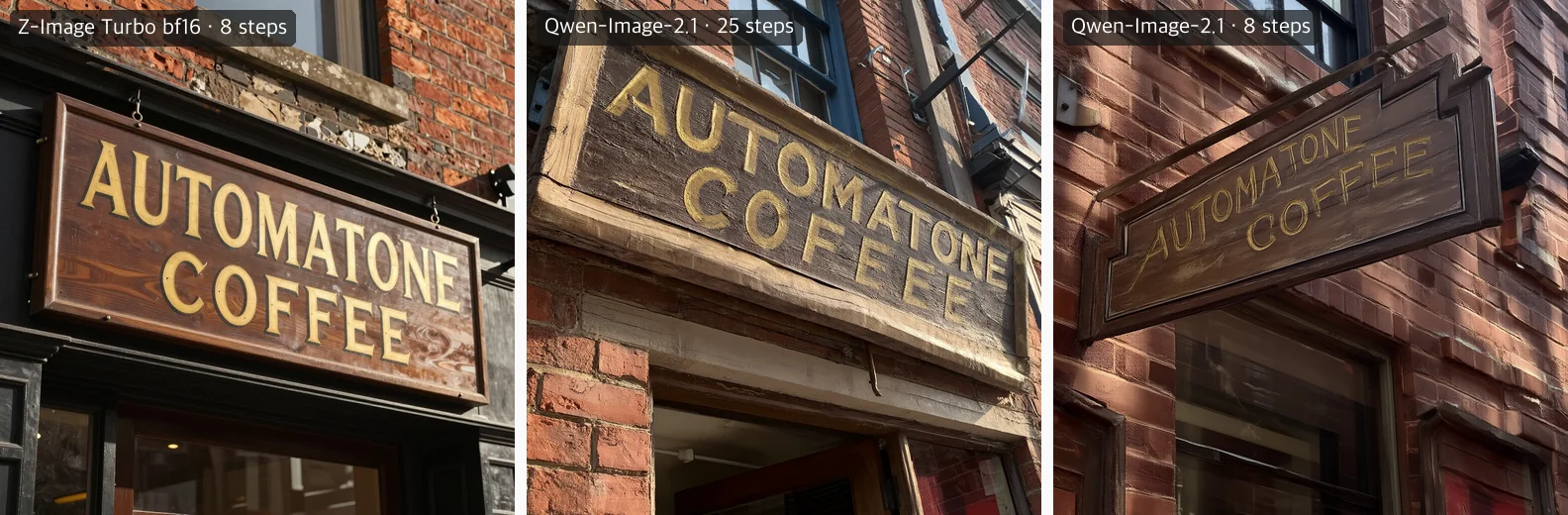
Seed 101, "AUTOMATONE COFFEE". Left to right: Z-Image Turbo bf16, Qwen-Image-2.1 at 25 steps, Qwen-Image-2.1 at 8 steps.
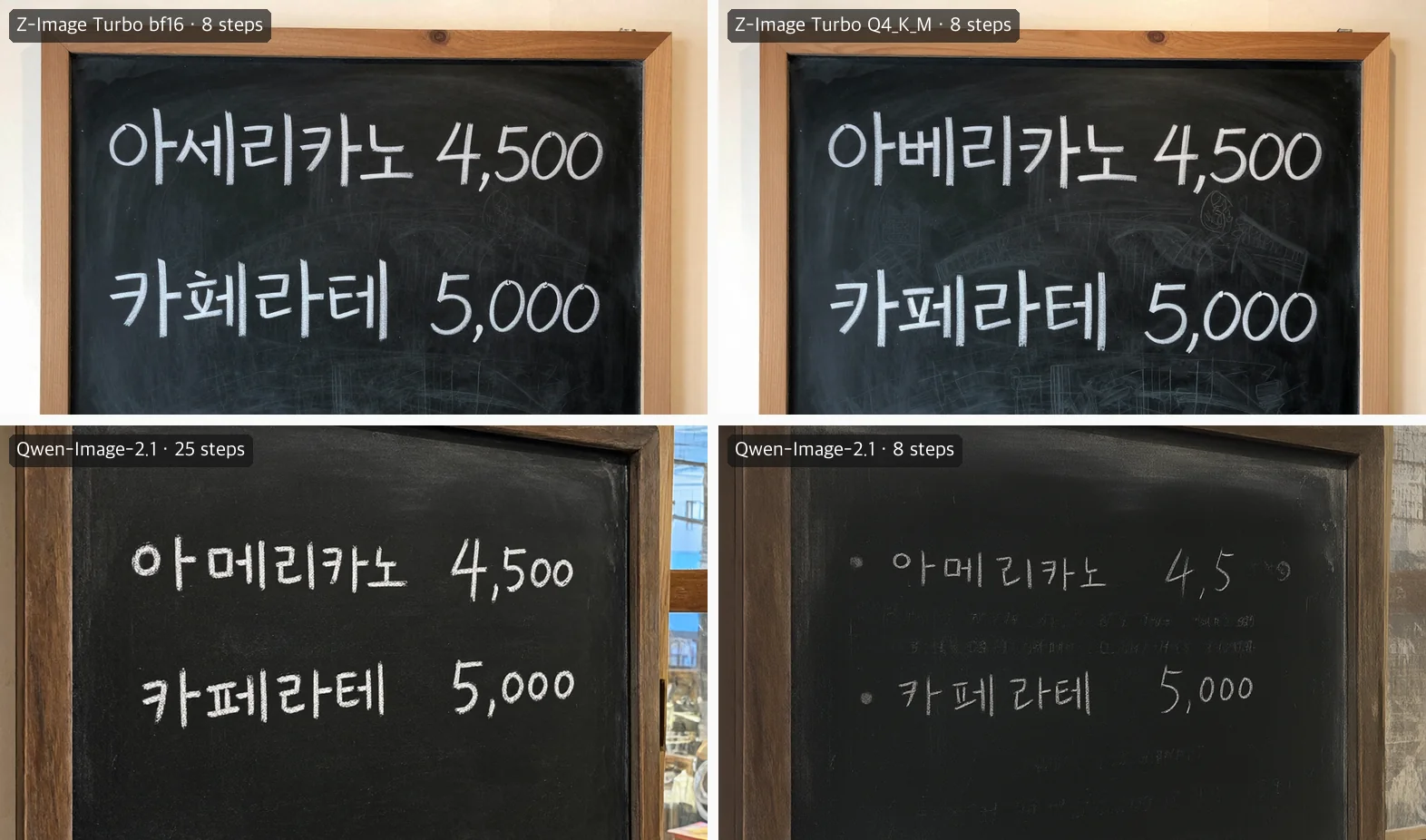
Seed 104, "아메리카노 4,500" and "카페라떼 5,000". Top: Z-Image Turbo bf16 and Q4_K_M. Bottom: Qwen-Image-2.1 at 25 and 8 steps.
Here is every text image. A ✓ means the text exactly matches the prompt.
| Image | Z-Image bf16 | Z-Image Q4_K_M | Qwen 25 steps | Qwen 8 steps |
|---|---|---|---|---|
| Sign, seed 101 | ✓ | ✓ (plus a stray painted "RUL" mark) | ✗ COFEEE | ✓ (flat, painterly) |
| Sign, seed 105 | ✓ | ✓ | ✓ | ✓ (brick wall warped) |
| Menu 104, Americano | ✗ 아세리카노 | ✗ 아베리카노 | ✓ | ✓ |
| Menu 104, latte | ✗ malformed 2nd syllable | 카페라테 | 카페라테 | 카페라테 |
| Menu 104, prices | ✓ ✓ | ✓ ✓ | ✓ ✓ | ✗ "4,5" · ✓ |
| Menu 108, Americano | ✗ 아세리카노 | ✗ 아세리카노 | ✓ | ✗ illegible |
| Menu 108, latte | 카페라테 | 카페라테 | 카페라테 | ✗ illegible |
| Menu 108, prices | ✓ ✓ | ✓ ✓ | ✓ ✓ | ✓ ✓ (loosely spaced) |
The pattern is clear:
- English signs are nearly solved by both. Z-Image spelled the sign right in all four of its images, and the 8-step Qwen did too. The 25-step Qwen made the only spelling error, COFEEE, which is exactly the mistake it made on this prompt in my previous post.
- Z-Image never wrote 아메리카노. Across four menus it wrote 아세리카노 three times and 아베리카노 once. The handwriting is clean and confident, which makes the misspelling easy to miss. Qwen at 25 steps wrote 아메리카노 correctly both times.
- Nobody wrote 카페라떼. Every legible latte line says 카페라테. That is not the spelling I asked for, but it is the standard Korean spelling of latte under the National Institute of Korean Language's loanword rules, and 카페라떼 is the common informal one. So both models did the same thing: they replaced the requested spelling with the standard one. Whether that counts as an error depends on what you need, so I list it separately rather than as a ✗.
- Numbers are easy. Both models got every price right at their default steps.
If Korean text in the image is the job, Qwen-Image-2.1 at 25 steps is the only one of the four that produced a usable menu, and it did so in both tries. Two tries is a small sample, so read that as "worked twice", not as a success rate.
Portraits: Z-Image overcooks the skin
The prompt asked for an elderly fisherman with deeply weathered skin, lit by warm window light from the left.
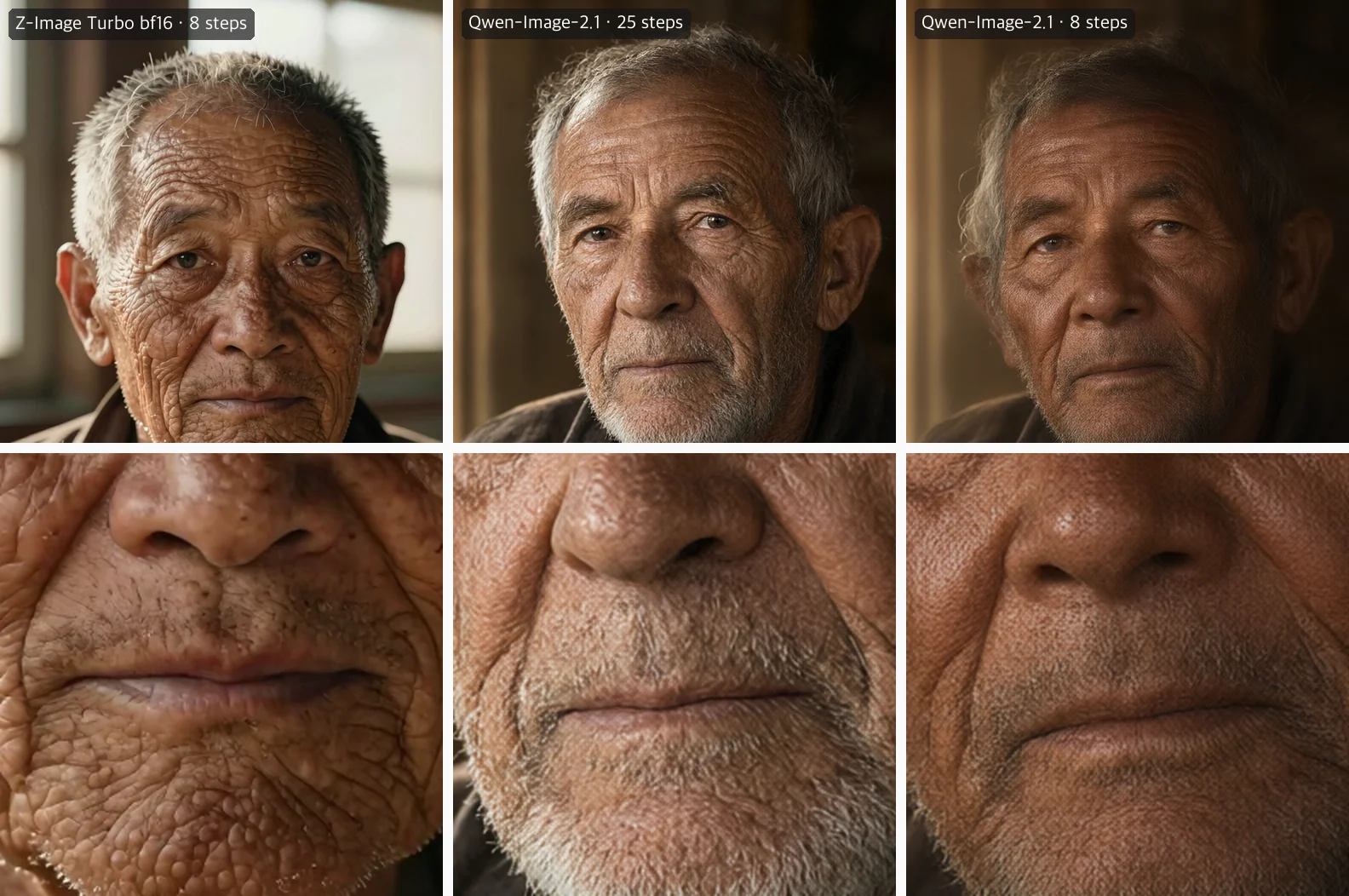
Seed 102. Top: face crops. Bottom: the skin around the mouth enlarged to 200%. Left to right: Z-Image Turbo bf16, Qwen 25 steps, Qwen 8 steps.
- Z-Image: sharp and dramatic at a glance. Enlarge it and the skin is covered in glossy, blister-like bumps, a texture closer to reptile skin than to an old man's face. Seed 106 put the light on the left as asked. Seed 102 lit the face mostly from the front, with the window behind him.
- Qwen at 25 steps: the more believable photograph. The wrinkles follow the face, there is stubble on one man and a white beard on the other, and the warm side light matches the prompt. At 200% there is a faint, regular cross-hatch pattern in the skin, like a fine screen. You will not see it at normal size, but you will if you crop.
- Qwen at 8 steps: the same composition as the 25-step image, but softer and flatter, with a stronger cross-hatch pattern.
Neither the prompt nor the settings named an ethnicity. Z-Image drew an East Asian man in all four of its portraits, and Qwen drew a European-looking man in all four. So with an open prompt, each model's default is different. If it matters to you, put it in the prompt.
Z-Image's two seeds also came out much closer to each other than Qwen's did: nearly the same man, jacket and framing for seeds 102 and 106. I saw the same across the other three prompts. With two seeds per prompt this is an observation, not a measurement of diversity.
Watch macro: pretty versus plausible
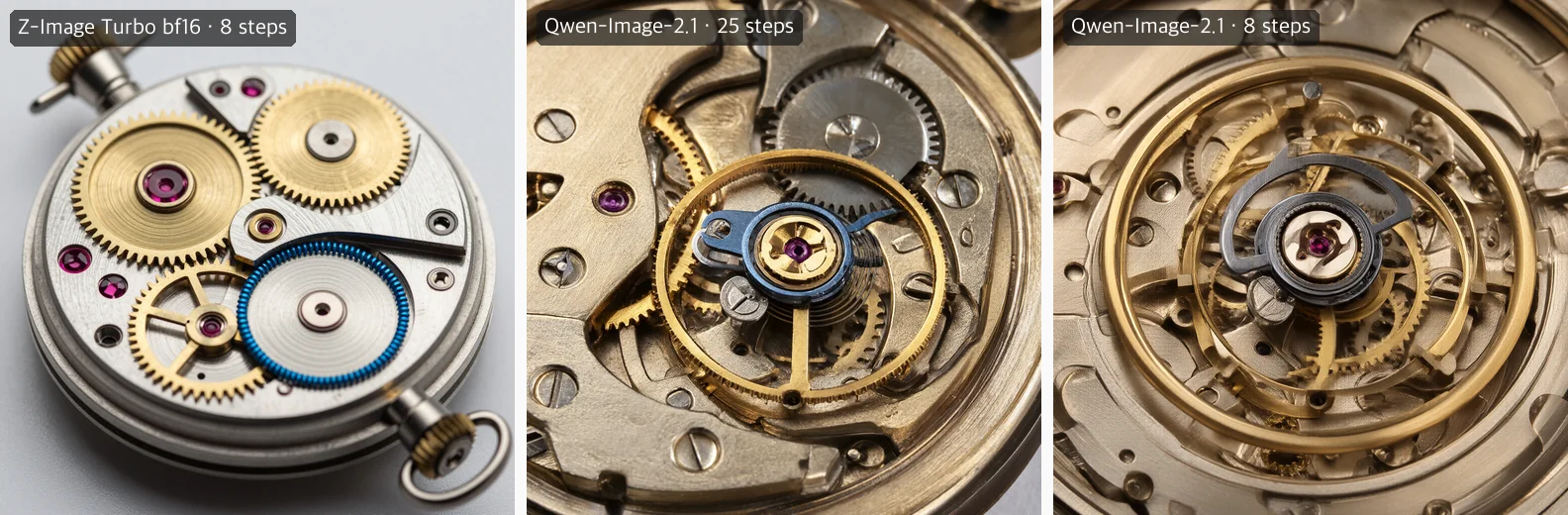
Seed 103, "an open mechanical watch movement, visible brass gears, ruby jewels and a blued steel balance spring". Left to right: Z-Image Turbo bf16, Qwen 25 steps, Qwen 8 steps.
- Z-Image produced the nicer product photo: a whole movement on a clean white background, crisp brass gears, saturated colors. As a mechanism it is wrong. There are winding crowns at both the top and the bottom of the case. The "blued steel balance spring" is a blue coil wrapped around the edge of a plain disc. There is no balance wheel or escapement. Several "jewels" are faceted gemstones sitting loose on the plate, where real watch jewels are drilled bearings set into it.
- Qwen at 25 steps went in close, as "macro" asks, and drew something much closer to a real movement: a balance wheel under a balance cock, jewels set in their holes, slotted screws, wheels that plausibly mesh. It still makes errors a watchmaker would catch. On seed 103 the balance rim has gear teeth and the blue went on the cock, not the spring. On seed 107 the hairspring is a stacked helix instead of a flat spiral.
- Qwen at 8 steps loses the structure: rims overlap and double, and parts blur into each other.
Can you just run Qwen at 8 steps?
No. That was the point of the matched-step run. At 8 steps Qwen-Image-2.1 takes 86 seconds per image, close to Z-Image Q4_K_M and only 1.5× slower than Z-Image bf16. But across all four prompts the output degrades in ways the 25-step images do not:
- textures go flat and painterly, and one brick wall warped (sign, seed 105)
- extra faint rows of gibberish appear on the chalkboard, and a price is cut to "4,5"
- the second menu becomes unreadable
- the portraits soften, and watch parts overlap and double
Z-Image Turbo is good at 8 steps because it was distilled to work at 8 steps. Qwen-Image-2.1 was not. Lowering the step count on a model that was not trained for it produces an unfinished image, not a fast one. If a few-step LoRA appears for 2.1, as one did for the previous Qwen-Image, that would change things. I did not look for one for this post.
Which one to run
| If you need… | Run | Why |
|---|---|---|
| Anything commercial | Z-Image Turbo | Apache 2.0. Qwen-Image-2.1's license is research and evaluation only |
| Fast drafts and iteration on 32GB | Z-Image Turbo bf16 | 58 s per image, the fastest here |
| Z-Image with less memory | Z-Image Turbo Q4_K_M | 12 GB peak instead of 19, but 40% slower |
| Korean text in the image | Qwen-Image-2.1, 25 steps | The only one to write 아메리카노 correctly, in both tries |
| Transparent PNGs or editing | Qwen-Image-2.1, 25 steps | Native RGBA and editing. Z-Image has neither |
| Mechanically believable objects | Qwen-Image-2.1, 25 steps | Closer to a real watch movement, though not correct |
| Qwen quality in under 90 s | Neither | 8-step Qwen is fast but visibly unfinished |
For English signage, either model works. Z-Image got it right four times out of four.
How I measured
- Machine: Apple M5 MacBook Pro, 32GB, macOS 26.6.2. ComfyUI 0.37.0 with PyTorch 2.13.0 on MPS. Measured 2026-10-01 with Docker and other heavy workloads stopped.
- Graphs: ComfyUI's official templates (
image_z_image_turbo.json,image_qwen_image_2_1_t2i.json), with only the model file, prompt, seed, size and step count changed. Z-Image usedres_multistep/simple, CFG 1,ModelSamplingAuraFlowshift 3. Qwen usedeuler/simple, CFG 1, empty negative prompt. - Files:
z_image_turbo_bf16.safetensors(11.5 GiB),z-image-turbo-Q4_K_M.gguf(4.7 GiB),qwen_image_2.1-Q8_0.gguf(7.0 GiB, from vantagewithai). The text encoders wereqwen3_4b_fp8_scaled(4.1 GiB) for Z-Image andqwen3vl_8b_int8_convrot(8.7 GiB) for Qwen. Note that Z-Image's template points to a bf16 text encoder, and I ran the fp8 one. The VAEs wereae.safetensorsandqwen_image_2.1_vae_bf16. GGUF files load through ComfyUI-GGUF'sUnetLoaderGGUF. - Prompts and seeds: four prompts (sign, portrait, watch, Korean menu), each run twice: prompt i used seeds 101+i and 105+i. Every configuration used the same eight prompt/seed pairs at 1024 × 1024.
- Timing: wall-clock time from submitting the prompt to receiving the image. "Cold" is the first image after ComfyUI's
/freeunloads all models, so it includes loading. "Warm" is the next seven images, reported as median, min and max. The prompt changes from image to image, so text encoding runs every time. - Memory: the ComfyUI process's physical footprint (
footprint -p), sampled every 400 ms. RSS is recorded too, but on macOS it leaves out compressed memory and GPU allocations, so I report footprint. The previous post explains why. - One contaminated run, replaced: in the first Z-Image session, the Q4_K_M cold image started while the bf16 model was still resident (footprint 14GB after
/free). I discarded that cold time (91.3 s) and measured Q4_K_M again from a clean start: 86.2 s cold, warm 80.8 s (n=2), within 1% of the original warm median of 81.7 s. The images from both sessions are pixel-identical, so the contamination affected timing, not output. - Swap: the machine already had 6–14GB of swap in use from earlier work when each run started, with 55–82% of memory free. Warm runs were consistent and faster than cold runs, which they would not be if generation were paging, so I do not think swap affected these numbers. It was not zero, though.
Limitations
- One machine. Every number is from one 32GB M5. I have no 16GB or NVIDIA results, and the ranking of bf16 against Q4_K_M in particular may not hold on CUDA.
- Two seeds per prompt. That is enough to see consistent failures, like 아세리카노 three times, but too few for rates. Quality judgments on the portrait and watch are mine, made by looking at full-resolution crops.
- Korean is officially claimed by neither model. Z-Image claims Chinese and English text rendering. Failing at Korean is not a broken promise. It is a gap you should know about.
- Different days, different numbers. On 2026-09-23 I measured Qwen-Image-2.1 Q8_0 at a warm median of 238 seconds with different prompts. Today it was 219. Prompts, seeds and the machine's state all differ, so treat a few percent between sessions as noise.
Reproducing it
The runs above used my own measurement harness, a Node script that drives a running ComfyUI over its HTTP API, unloads models between configurations, and samples footprint in the background. It lives in this site's private repository, so you can't download it. The commands below are there to show exactly which settings each run used. The prompts file has one prompt per line, the four prompts in order.
# Z-Image Turbo: bf16 and Q4_K_M, 8 steps (template default)
node scripts/measure-comfy-image.mjs --model zimage \
  --dit z_image_turbo_bf16.safetensors --dit z-image-turbo-Q4_K_M.gguf \
  --warm 7 --seeds 101,102,103,104,105,106,107,108 \
  --prompts-file compare-prompts.txt --out compare-zimage

# Qwen-Image-2.1 Q8_0, 25 steps (template default), then 8 steps
node scripts/measure-comfy-image.mjs --model qwen21 --dit qwen_image_2.1-Q8_0.gguf \
  --warm 7 --seeds 101,102,103,104,105,106,107,108 \
  --prompts-file compare-prompts.txt --out compare-qwen21
node scripts/measure-comfy-image.mjs --model qwen21 --dit qwen_image_2.1-Q8_0.gguf --steps 8 \
  --warm 7 --seeds 101,102,103,104,105,106,107,108 \
  --prompts-file compare-prompts.txt --out compare-qwen21-8step
You can get the same numbers by hand. Load each official template, set the values listed in the methodology, run each image once after a fresh model unload and then several more times, and watch footprint -p $(lsof -ti tcp:8188 -sTCP:LISTEN) (the process serving ComfyUI's port) in another terminal while each image generates.
References
- Z-Image Turbo model card and license: Tongyi-MAI/Z-Image-Turbo, GitHub, technical report arXiv:2511.22699
- Z-Image ComfyUI files and guide: Comfy-Org/z_image_turbo, ComfyUI docs
- Z-Image GGUF quantizations: unsloth/Z-Image-Turbo-GGUF
- Qwen-Image-2.1 model card and license: Qwen/Qwen-Image-2.1, license text
- Qwen-Image-2.1 in ComfyUI: Comfy-Org/Qwen-Image-2.1, ComfyUI docs
- My earlier Qwen-Image-2.1 quantization and license measurements: Qwen-Image-2.1 on a 32GB Mac
- Measurements: Apple M5 MacBook Pro 32GB, macOS 26.6.2, ComfyUI 0.37.0, 2026-10-01