Local LLMs don't have a price tag. Every model in this guide is open-weight and free to download, so the only thing standing between you and a private, offline chatbot is memory. That's the real spec to shop for.
But the useful thing to learn here isn't a list of model names — those turn over every couple of months. It's the arithmetic. Once you can estimate what a given model will cost you in RAM, you can evaluate next quarter's releases yourself, without waiting for someone to publish a new shortlist.
So this post front-loads the calculation and treats the models as worked examples of it.
Everything below runs through Ollama, LM Studio, or llama.cpp.
Updated 2026-10-01: sizes re-checked against the Ollama registry; the disk-vs-resident section re-measured on Ollama 0.33.3.
The three numbers RAM decides
Every "will it run?" question breaks into three separate quantities. People conflate them constantly, and that's where the bad advice comes from.
1. The quantized weight size (what you download).
The default local format is Q4_K_M. At Q4_K_M, a model eats about 0.6–0.65 GB per billion parameters on disk — it's a 4-bit format in name, but the K-quant metadata and higher-precision layers push the real cost closer to 5 bits per weight. Multiply the parameter count by 0.62 and you'll be within a few hundred megabytes for most dense models.
2. Resident memory (what the runtime actually holds).
The download is the floor, not the total. Loading adds runtime overhead on top of the weights — figure another 10–20% at small context. This is the distinction that makes a 15 GB download a ~17 GB process, and it's why "it fits on disk" and "it fits in RAM" are different sentences.
3. The KV cache (what your context window costs). At 8K tokens the cache is small enough to hide inside that 10–20%. Push to 128K or 256K and it can swell to several times the size of the weights. Advertised context windows are a ceiling you buy with memory, not a free feature.
Put together:
| Model size | Download (Q4_K_M) | Est. RAM @ 8K ctx | Comfortable on |
|---|---|---|---|
| 7–8B | 5–5.5 GB | ~6–6.5 GB | 16GB |
| 13–14B | ~9 GB | ~10–11 GB | 16GB (tight) |
| 24B | 15 GB | ~17–18 GB | 32GB |
| 32B | 20 GB | ~22–24 GB | 32GB |
| 70B | 43 GB | ~46–48 GB | workstation only |
Sizing checked 2026-07-31 and re-checked 2026-10-01 against the Ollama registry.
Where the rule breaks — and why that matters more than the rule
The 0.62 GB-per-billion figure holds tightly for dense models. Three things break it, and knowing which is which saves you from guessing wrong on a model you've never heard of:
- Mixture-of-experts. MoE builds carry all their parameters in memory even though only a fraction activate per token. They land nearer 0.69 GB per billion — and their speed advantage comes from the active count, not the resident count. You pay for total, you get the latency of active.
- Native non-GGUF formats. gpt-oss-20b ships in MXFP4 rather than
Q4_K_M, so the usual arithmetic doesn't apply to it at all. - Multimodal and "effective parameter" builds. Gemma 4's E4B is the clean counterexample: it behaves like a 4.5B-effective model (8B with embeddings) at inference, but its
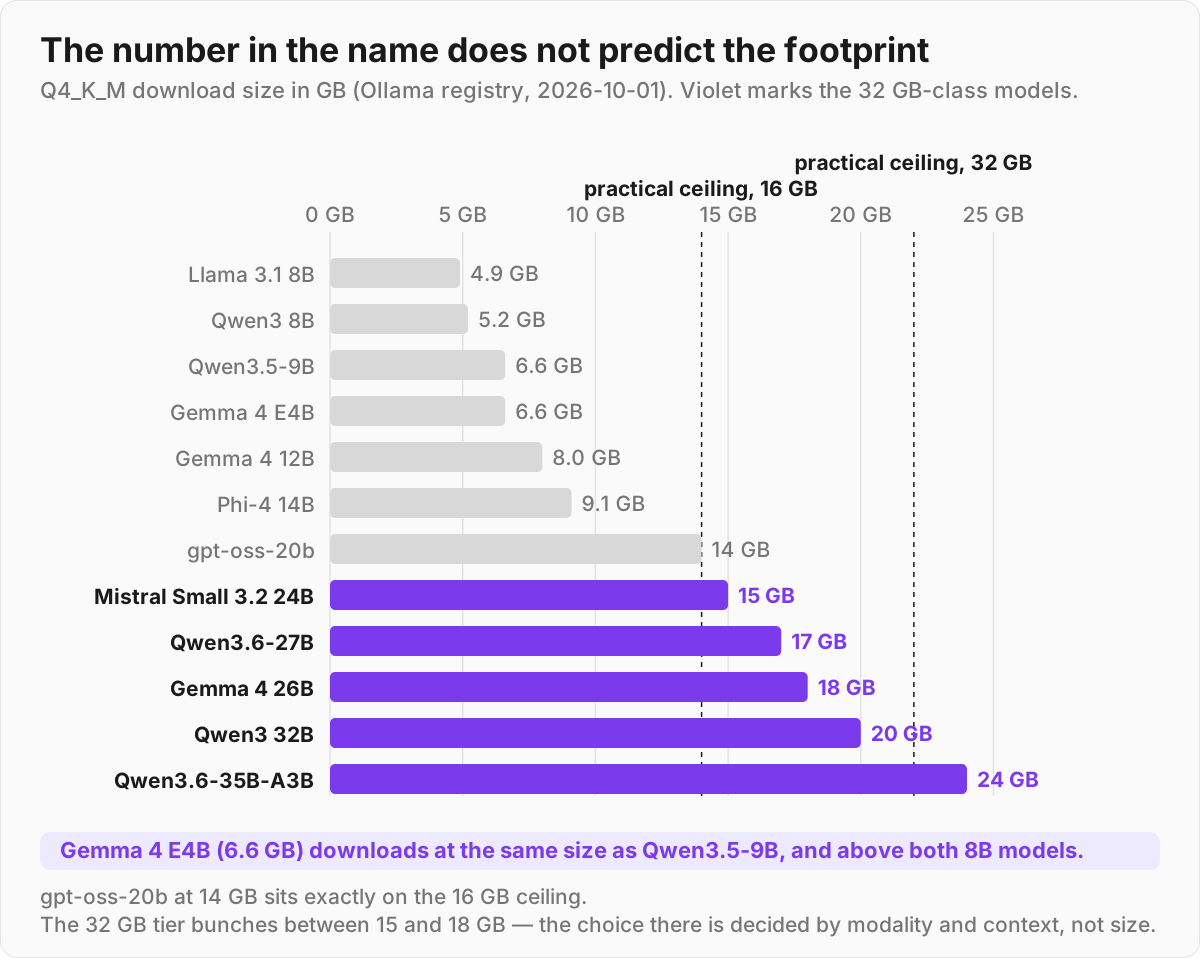
Q4_K_Mbuild downloads at 6.6 GB — the same as Qwen3.5-9B, and more than either 8B model on the shortlist. The registry entry itself moved, too: this post listed the same tag at 9.6 GB in July. The number in a model's name does not predict its footprint. Check the registry, not the label.
That last point is worth internalizing, because it's the one that survives every future release.
Disk size is not resident memory — see for yourself
Pull a model, load it, and then ask the operating system — not Ollama — how much memory the model server is holding:
ollama pull gemma4:12b-it-q4_K_M
ollama list                                # size on disk
ollama run gemma4:12b-it-q4_K_M "hello"    # loads it; stays resident ~5 min by default
ollama ps                                  # Ollama's own SIZE column — see below
ps -o rss= -p "$(pgrep -d, -f llama-server)" | awk '{printf "%.2f GiB\n", $1/1048576}'
On macOS the model runs in a separate llama-server process inside Ollama.app, which is what pgrep finds. ps -o rss= reports kilobytes on both macOS and Linux; if pgrep comes back empty on your install, find the model process under ollama serve in ps aux and use its PID.
Here is what that looked like on my machine:
# 2026-10-01 · Apple M5 MacBook Pro, 32 GB · macOS 26.6.2 · Ollama 0.33.3
$ ollama list | grep -E '^NAME|gemma4:12b-it-q4_K_M'
NAME                                                        ID              SIZE      MODIFIED
gemma4:12b-it-q4_K_M                                        6114515d63c1    8.0 GB    12 seconds ago
$ ollama run gemma4:12b-it-q4_K_M "hello"
$ ollama ps
NAME                    ID              SIZE      PROCESSOR    CONTEXT    UNTIL
gemma4:12b-it-q4_K_M    6114515d63c1    1.3 GB    100% GPU     65536      4 minutes from now

# the llama-server process while loaded — one reading per tool
ps -o rss=              9.36 GiB
footprint -p            phys_footprint 2208 MB
vmmap --summary         Physical footprint: 2.2G
weights file on disk    7.38 GB (6.87 GiB)
Same model, four different numbers. ollama list is the download — 8.0 GB, of which 7.38 GB is the weights file — and ollama ps said 1.3 GB, which on Ollama 0.33.3 plainly does not reflect the loaded weights for this model, so don't size RAM from it. The server's resident set (RSS) was 9.36 GiB: the weights, which llama-server memory-maps straight from that file, plus roughly 2.5 GiB of KV cache and runtime buffers for the 65,536-token context Ollama picked by default — eight times the 8K the estimates in this post assume. The 2.2 GB footprint figure, which is what Activity Monitor's Memory column tends to show, is small for the opposite reason: it leaves the mapped weights out. So size your RAM by the RSS of the server process: resident ≈ weights + KV cache for your context + buffers.
The shortlist
All models below are free and open-weight. Sizes are Q4_K_M builds from the Ollama registry, except gpt-oss which ships in native MXFP4.
| Model | Params (total / active) | Download (Q4_K_M) | Est. RAM @ 8K ctx | Context | License | Modality |
|---|---|---|---|---|---|---|
| Llama 3.1 8B | 8B dense | 4.9 GB | ~5.5–6 GB | 128K | Llama Community | Text |
| Qwen3 8B | 8B dense | 5.2 GB | ~6–6.5 GB | 40K | Apache 2.0 | Text |
| Qwen3.5-9B | 9B dense | 6.6 GB | ~7.5–8 GB | 256K | Apache 2.0 | Text + image + video |
| Gemma 4 E4B | 4.5B effective (8B w/ embeddings) | 6.6 GB | ~7.5–8 GB | 128K | Apache 2.0 | Text + image + audio |
| Gemma 4 12B | 12B dense | 8.0 GB | ~9–9.5 GB | 256K | Apache 2.0 | Text + image + audio (video by frame sampling) |
| Phi-4 14B | ~14B dense | 9.1 GB | ~10–11 GB | 16K | MIT | Text |
| gpt-oss-20b | 21B / 3.6B (MXFP4) | 14 GB | ~16–17 GB | 128K | Apache 2.0 | Text |
| Mistral Small 3.2 24B | 24B dense | 15 GB | ~17–18 GB | 128K | Apache 2.0 | Text + image |
| Qwen3.6-27B | 27B dense | 17 GB | ~19–20 GB | 256K | Apache 2.0 | Text + image |
| Gemma 4 26B | 26B / ~4B (A4B) | 18 GB | ~20–21 GB | 256K | Apache 2.0 | Text + image (video by frame sampling) |
| Qwen3 32B | 32B dense | 20 GB | ~22–24 GB | 40K | Apache 2.0 | Text |
| Qwen3.6-35B-A3B | 35B / 3B | 24 GB | ~26–28 GB | 256K | Apache 2.0 | Text + image |
Download sizes come from the Ollama registry. "Est. RAM" applies the 10–20% overhead band from the section above and assumes 8K context — it is an estimate, not a measurement. Context windows are the registry's own figures for each model's default tag; modality follows each model's card on Hugging Face (Ollama's registry pages currently list only text and image for some of these).
16GB tier — what to actually run
Sixteen gigabytes is the laptop default, and it's enough for a genuinely useful model. The practical ceiling is about 14 GB of weights; past that, the OS and your browser start fighting the model for memory.
Gemma 4 12B is the laptop pick. It pulls at 8.0 GB at Q4_K_M, with a 256K context window and native text, image, audio and video input. Gemma 4 E4B (6.6 GB at Q4_K_M, 128K context) is the lighter option — 1.4 GB smaller on disk, but with half the context and the 4.5B-effective compute profile, so reach for it when memory, not quality, is the constraint.
If you're memory-constrained and set on E4B, Google's QAT build trims it further, to 6.1 GB.
Qwen3.5-9B is the pick if you want one general-purpose model. Released February 2026 under Apache 2.0, it pulls at 6.6 GB, carries a 256K context window, and accepts text, image and video input. On specs it strictly supersedes the Qwen3 8B most guides still recommend — newer, longer context, multimodal, for 1.4 GB more on disk. Note the scope of that claim: it's a spec comparison.
I haven't found a head-to-head primary source showing it wins on general output quality, so don't assume the upgrade is free of regressions for your workload.
Llama 3.1 8B (4.9 GB) is the alternative when you live inside Llama-based tooling. Smallest download here, slightly more restrictive Llama Community license, and the largest ecosystem of fine-tunes and integrations on the list.
Phi-4 14B is the specialist. Microsoft's ~14B dense model (MIT license) punches above its weight on math and logic — it scores roughly 80% on MATH — and lands at 9.1 GB. The catch is its 16K context window, which is small by 2026 standards. Use it as a reasoning helper, not a long-document reader.
gpt-oss-20b is the quality ceiling for a 16GB box, and it lands exactly on that ceiling. OpenAI's open model is 21B total but only ~3.6B active, and it ships in native MXFP4 — that's what lets a 20B-class model get this close at all.
But 14 GB of weights leaves under 2 GB for the OS and the KV cache, so on a 16GB machine you're running it with no margin. It's the model that makes the case for 32GB.
32GB tier — room to stretch
Double the RAM and the arithmetic opens up: 24B–35B models fit with genuine headroom for context. What's striking about this tier in mid-2026 is how tightly the options cluster — most land between 15 and 18 GB. Size stops being the deciding variable. Modality and context window take over.
Mistral Small 3.2 24B is the "one model for everything" pick, at 15 GB. The June 2025 refresh (the 2506 build) sharpened instruction-following hard — Arena Hard v2 roughly doubled over 3.1 — and it posts a HumanEval Plus around 92.9%. A 24B dense model with a 128K context window, image input, Apache 2.0.
Qwen3.6-27B (released 2026-04-22, Apache 2.0) is the current quality-and-coding pick at 17 GB, with a 256K context window. It posts SWE-bench Verified 77.2 and Terminal-Bench 2.0 59.3, which is why it also replaces the older Qwen2.5-Coder 32B recommendation you'll still find in circulation — that model's 32K context is a hard constraint for agentic work on real repositories.
If you specifically want a mixture-of-experts profile, Qwen3.6-35B-A3B (2026-04-16) is 24 GB with 3B active per token; the active-parameter ratio is where its speed comes from, and it's the largest thing on this list that a 32GB machine can hold.
Gemma 4 26B (18 GB) is the long-context multimodal play, reaching up to 256K context with only ~4B parameters active (Google labels it "A4B"). On modality, the sources disagree, so be precise about what you're getting: 26B and 31B take text and image natively; video is handled by frame sampling rather than as a first-class modality. Only the E2B/E4B/12B variants accept audio.
Qwen3 32B (20 GB) remains a solid dense option if you already have it pulled, but at 22–24 GB resident it costs meaningfully more headroom than Qwen3.6-27B for no context advantage.
ollama pull qwen3.5:9b             # 6.6 GB — 16GB tier generalist
ollama pull gemma4:12b-it-q4_K_M   # 8.0 GB — 16GB tier multimodal
ollama pull qwen3.6:27b-q4_K_M     # 17 GB  — 32GB tier
What does NOT fit 16/32GB
Manage expectations here, because the model zoo is full of names that won't load on a normal machine:
- Llama 3.3 70B — 43 GB at
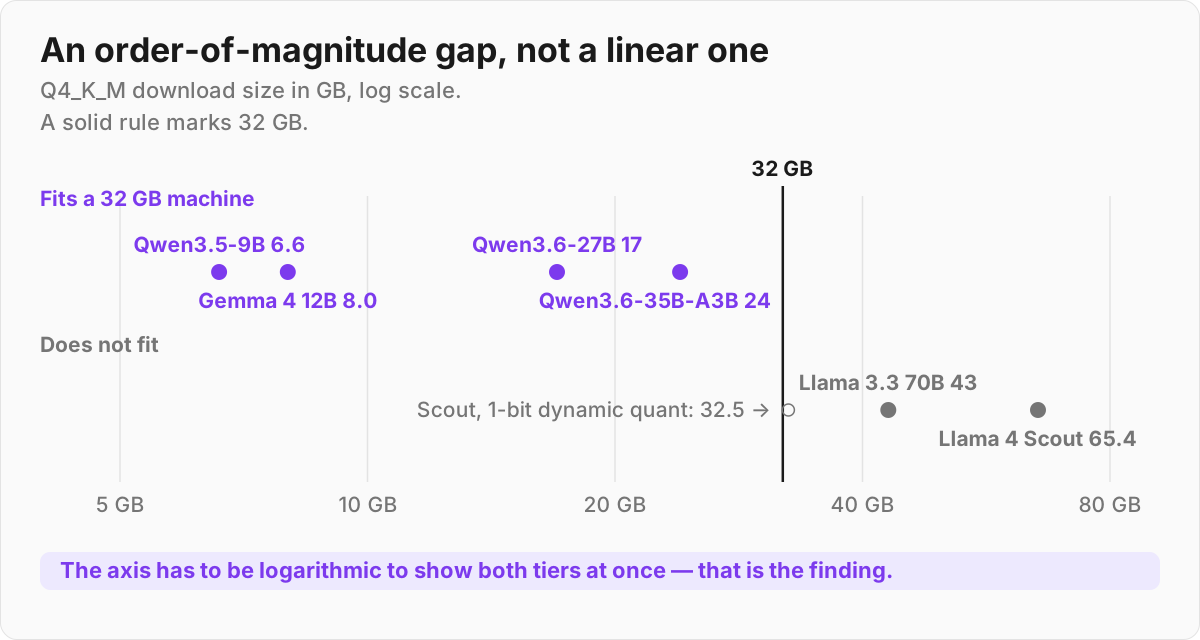
Q4_K_M, 46–48 GB resident. Needs a workstation, or a quant so aggressive it hurts quality. - Llama 4 Scout — 109B total / 17B active MoE, ~65 GB at
Q4_K_M(Unsloth's GGUF build on Hugging Face; Ollama's ownllama4:scouttag is 67 GB). You'd need a 1-bit dynamic quant (~33 GB) to even approach a 32GB machine, and at that point you're not really running Scout anymore.
The gap is the point. From the largest model a 32GB laptop holds (24 GB) to the frontier open weights, the jump isn't incremental — it's a different order of magnitude, and no amount of patience closes it.
Verdict — which should you pick?
| Your situation | Pick |
|---|---|
| 16GB, "just give me one" | Qwen3.5-9B (6.6 GB) |
| 16GB, laptop / offline / multimodal | Gemma 4 12B (8.0 GB) |
| 16GB, deepest Llama tooling | Llama 3.1 8B (4.9 GB) |
| 16GB, math / logic helper | Phi-4 14B (9.1 GB) |
| 16GB, absolute quality ceiling (no margin) | gpt-oss-20b (14 GB) |
| 32GB, one model for everything | Mistral Small 3.2 24B (15 GB) |
| 32GB, coding & agents | Qwen3.6-27B (17 GB) |
| 32GB, long context + image | Gemma 4 26B (18 GB) |
| 32GB, MoE profile / largest that fits | Qwen3.6-35B-A3B (24 GB) |
Start with the "just give me one" pick for your RAM tier, run it for a week, and only then reach for a specialist if you hit a wall.
FAQ
Can I run a 70B model on 32GB of RAM?
Not comfortably. A 70B model at Q4_K_M downloads at 43 GB and needs roughly 46–48 GB resident, which exceeds 32GB before you add any context. You can technically load one with extreme quantization or by offloading to disk, but the quality drop and slowdown make it a bad trade. Stick to 24–35B models on 32GB.
Does running locally use my GPU or my RAM?
Both, depending on your setup. On a Mac with Apple Silicon, the unified memory pool serves CPU and GPU together, so "RAM" is the number that matters. On a PC with a discrete GPU, models load into VRAM first and spill into system RAM when VRAM runs out — and that spill is slow, so VRAM is usually the real ceiling. ollama ps reports the split in its PROCESSOR column.
What is Q4_K_M and should I use it?
Q4_K_M is the default sweet spot for local models. It's called 4-bit, but K-quant metadata and higher-precision layers put the real cost near 5 bits per weight — which is exactly why the sizing rule is 0.6–0.65 GB per billion parameters rather than 0.5. For almost everyone it's the right starting point. Move to Q6, Q8 or FP16 only if you have spare memory and notice quality issues; move to a QAT build (as Gemma 4 E4B offers, at 6.1 GB) if you need to go smaller with less damage than a plain low-bit quant.
How much context can I actually use?
Less than the model's maximum, usually. The advertised 128K and 256K windows are real, but the KV cache to hold that much text can use several times the memory of the weights themselves. On 16/32GB machines, expect to run comfortably at 8K–32K and treat the headline numbers as a ceiling you reach only by giving up model size.
References
- Quantized sizes and tags: Ollama model registry (checked 2026-07-31, re-checked 2026-10-01)
- Gemma 4: blog.google · model card
- gpt-oss: openai.com · Hugging Face
- Qwen3 / Qwen3.5: qwenlm.github.io · qwen.ai
- Phi-4: Microsoft Tech Community · Ollama
- Mistral Small 3.2: Hugging Face · Mistral docs