You ran a perfectly normal requests.get() and got this instead of your data:
requests.exceptions.SSLError: HTTPSConnectionPool(host='example.com', port=443):
Max retries exceeded with url: / (Caused by SSLError(
SSLCertVerificationError(1, '[SSL: CERTIFICATE_VERIFY_FAILED] certificate verify
failed: unable to get local issuer certificate (_ssl.c:1006)')))
The fast, wrong answer is verify=False. Don't. It turns off certificate checking entirely and leaves you open to anyone sitting between you and the server. There's almost always a correct fix that takes the same thirty seconds, and which one you need depends on why the check failed. So let's figure that out first, then fix it.
What the error actually means
requests validates TLS certificates by default. To do that it needs a set of trusted root certificates — the "certificate authorities" that vouch for everyone else. It gets them from the certifi package, which ships a copy of Mozilla's curated root store.
When you see CERTIFICATE_VERIFY_FAILED, Python is telling you it could not build a chain from the server's certificate up to a root it trusts in that bundle.
Four things cause that:
- Your CA bundle is stale or missing a root (most common).
- The server's certificate is genuinely expired or invalid.
- The server uses a self-signed certificate.
- A corporate firewall is decrypting your HTTPS and re-signing it with a private CA your bundle has never heard of.
The two sub-messages you'll see most are unable to get local issuer certificate (a trust-store problem on your side) and certificate has expired — which sounds like the server's fault but can equally be an expired root still sitting in your own bundle. Different causes, different fixes; guessing wastes time.
Ignore the line number in (_ssl.c:1006), by the way. It points into CPython's _ssl C source and shifts between builds, so yours may read a different number for the identical failure.
Diagnose before you paste commands
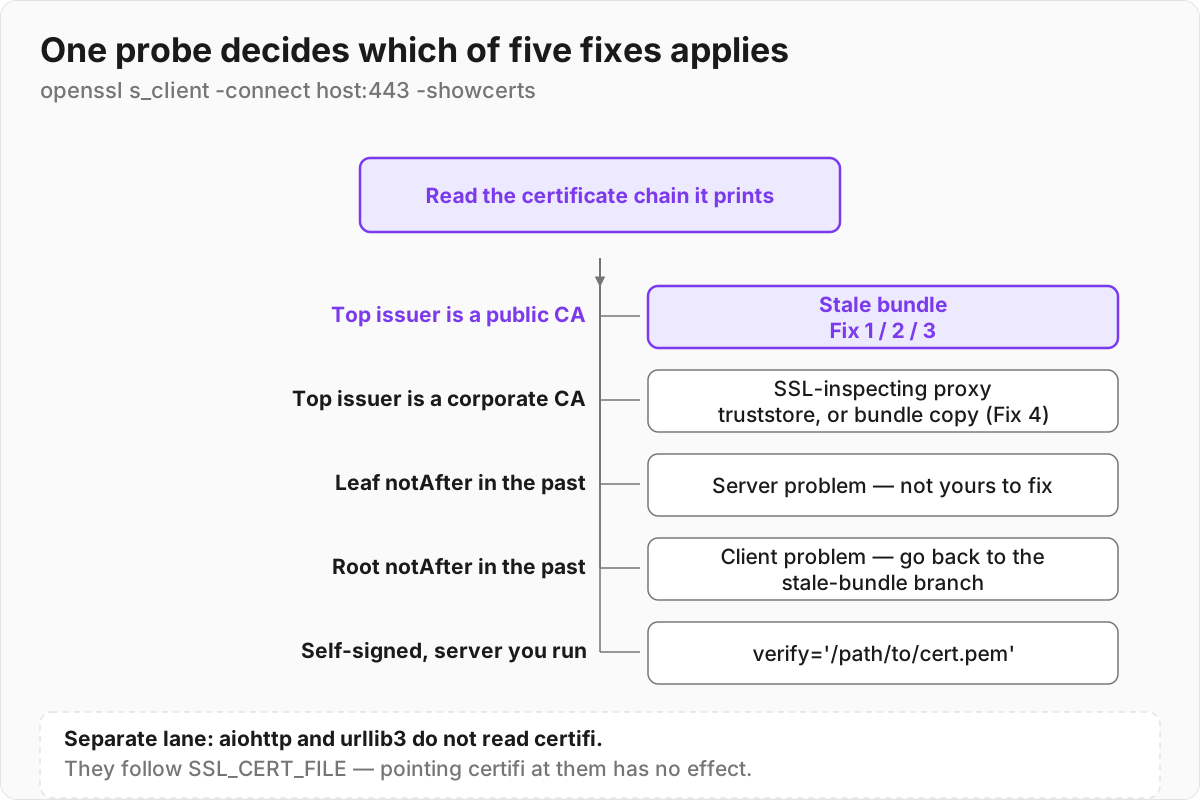
One quick probe routes you to the right section — and it doesn't require turning verification off. Read the chain the server actually sends:
openssl s_client -connect example.com:443 -servername example.com -showcerts </dev/null
Look at two things. The issuer of the top certificate: if it's a public CA you recognise, your bundle is stale — Fix 1, 2, or 3. If it's your employer's name, you're behind SSL inspection — Fix 4. And the notAfter dates: if the leaf has already expired, that's the server's problem, not yours.
Fix 1 — Update the CA bundle (solves most cases)
If your bundle is just old, it may be missing roots that were added to Mozilla's store recently. certifi is calendar-versioned and re-released whenever that store changes, so "old" can mean a few months. Upgrade it:
pip install --upgrade certifi
requests and httpx pick up the new bundle automatically — both default to certifi.where(). urllib3 on its own and aiohttp do not: they build a bare ssl.create_default_context() and read the OS trust store, so upgrading certifi changes nothing for them. If that's your stack, skip to Fix 3 — SSL_CERT_FILE reaches them through OpenSSL's default paths.
If something on your system is still shadowing the default bundle, point requests at the fresh one explicitly:
import requests, certifi
requests.get("https://example.com", verify=certifi.where())
certifi.where() returns the absolute path to the cacert.pem you just upgraded, so this sidesteps whatever stale copy was being found first.
Fix 2 — macOS: run Install Certificates.command
This one trips up a lot of people. Since Python 3.6, the official python.org macOS installers ship their own copy of OpenSSL and do not install root certificates into the operating system. A fresh Python on a fresh Mac literally has no trust store until you give it one.
The installer drops a script to fix exactly this. Run it once:
open "/Applications/Python 3.14/Install Certificates.command"
Adjust the version number to match your install. Double-clicking it in Finder works too. Under the hood it runs pip install --upgrade certifi and then creates a symlink at OpenSSL's default cafile location pointing at certifi's bundle. Remember that symlink — it's why Fix 2 can quietly undo Fix 4.
Homebrew's Python usually has no such script. There the direct fix is:
brew install ca-certificates
Homebrew's OpenSSL takes its trust store from that formula. Upgrading certifi (Fix 1) or setting an environment variable (Fix 3) also works.
Fix 3 — Set it globally with environment variables
When you want every script and subprocess to use the right bundle without editing any code — CI runners, containers, a machine you're debugging remotely — use environment variables:
| Variable | Read by | Use it when |
|---|---|---|
REQUESTS_CA_BUNDLE |
requests — and pip, which vendors requests |
You care about requests-based code, pip included |
SSL_CERT_FILE |
Python's ssl module / OpenSSL broadly |
You want urllib, urllib3, and aiohttp covered too |
PIP_CERT (or pip --cert) |
pip specifically | You only need to unblock installs |
Point them at certifi's bundle, or at the system bundle on Linux:
# Use certifi's bundle
export SSL_CERT_FILE=$(python -m certifi)

# Or the system bundle on Debian/Ubuntu
export SSL_CERT_FILE=/etc/ssl/certs/ca-certificates.crt
Note that pip is its own case: it vendors requests and certifi rather than going through the ssl module's OpenSSL defaults, so SSL_CERT_FILE does not reach it. pip documents --cert / PIP_CERT and REQUESTS_CA_BUNDLE / CURL_CA_BUNDLE instead.
In a Dockerfile or CI config, set these once and every process inherits them. This is usually cleaner than threading verify= through application code.
Fix 4 — Corporate proxy or self-signed certificate
If the openssl s_client output showed a top certificate issued by something with your company's name on it, an inspection appliance is decrypting your HTTPS and re-signing it with an internal CA that certifi doesn't contain, and never will.
Before you edit any bundle: if IT already pushed that root into the OS keychain or Windows certificate store — they usually have — you don't need to copy anything. Let Python read the system store directly:
pip install truststore
import truststore; truststore.inject_into_ssl()
This covers requests, urllib3 and httpx at once, and it keeps working when IT rotates the CA. pip itself has done this by default since 24.2.

If you do need to build a bundle by hand, get the corporate root certificate from IT (or export it from your browser's certificate viewer) — but don't append it where you think.
Do not append to certifi's own file. Both Fix 1 and Fix 2 run pip install --upgrade certifi, which overwrites it and silently removes your corporate root. Copy it once and point at the copy:
cp "$(python -m certifi)" ~/.certs/ca-bundle.pem
cat corp-root.pem >> ~/.certs/ca-bundle.pem
export REQUESTS_CA_BUNDLE=~/.certs/ca-bundle.pem
export SSL_CERT_FILE=~/.certs/ca-bundle.pem
Two more reasons the copy is the better habit: writing to a system-wide site-packages may need sudo, and inside a virtualenv you'd only be patching that one environment anyway.
For a self-signed server you control, you don't need to disable anything — just hand requests the server's public certificate:
requests.get("https://internal.example.com", verify="/path/to/cert.pem")
The connection stays encrypted and verified. That's the difference between verify='/path/cert.pem' and verify=False: both stop the error, but only one keeps you safe.
If you're working with lower-level code (urllib, raw sockets) and upgrading certifi alone doesn't take, build the context explicitly:
import ssl, certifi
ctx = ssl.create_default_context(cafile=certifi.where())
The last resort, and why to skip it
requests.get(url, verify=False) # don't ship this
This disables certificate validation completely. The request still encrypts, but you no longer check who you're talking to — which is the entire point of TLS. Anyone able to intercept the connection can impersonate the server and you'll never know. It also spams urllib3's InsecureRequestWarning into your logs.
And it isn't a diagnostic either. verify=False sets cert_reqs to CERT_NONE, which switches off expiry, hostname and chain checking in one move — so a request that suddenly succeeds tells you nothing about which of the four causes you have. An expired server certificate and a stale local bundle both go quiet.
openssl s_client answers the same question without lowering anything, which is why the diagnosis above uses it. Never in code that runs more than once, and never in production.
Quick reference
| Symptom | Cause | Fix |
|---|---|---|
unable to get local issuer certificate, issuer is a public CA |
Stale/missing CA bundle | pip install --upgrade certifi |
| Fresh Python on macOS, no certs | python.org installer skips OS certs | Run Install Certificates.command |
Need to fix all scripts at once, or you're on urllib3/aiohttp |
Per-process trust store | export SSL_CERT_FILE=$(python -m certifi) |
| Issuer carries your employer's name | SSL-inspection proxy | truststore, or a copy of the bundle with the corporate root appended |
| Your own self-signed server | Cert not in any public store | verify='/path/to/cert.pem' |
certificate has expired |
Server's cert expired — or an expired root is still in your bundle | Check notAfter on the leaf with openssl s_client before blaming the server |
Run the openssl s_client probe first and read off the row it puts you on, rather than working down the table from the top. The order matters more than it looks: if you're on the proxy row, running Fix 1 or Fix 2 afterwards will overwrite certifi's bundle and take your corporate root with it.