Running DeepSeek on your own machine means the prompts never leave your hardware, there are no per-token fees, and there are no rate limits to bump into. The catch most guides skip: the DeepSeek you run at home is almost never the same model behind the hosted app.
With Ollama, though, you can have a real DeepSeek reasoning model answering prompts in your terminal in about ten minutes. Here's the clean version.
What you'll need
Ollama runs on macOS, Windows, and Linux. The model you can actually run depends on memory more than anything else:
- A 1.5B model runs CPU-only on ~8 GB of system RAM (slow, but it works with no GPU).
- The 7B/8B models are the sweet spot for most laptops and desktops: 6–8 GB of VRAM, 16 GB+ system RAM.
- Bigger sizes need a real GPU. The full 671B model needs a server, not a laptop.
There's a full size table further down. If you're not sure, start with deepseek-r1:8b and step down if it's too slow.
Step 1: Install Ollama
On macOS and Windows, download the installer from ollama.com/download and run it. On Linux, one command does it:
curl -fsSL https://ollama.com/install.sh | sh
Confirm it's installed and check the version:
ollama --version
The current release is v0.32.14 (August 15, 2026), and Ollama ships new builds every few days — don't anchor to that number, just check the releases page. Any recent v0.32.x is fine for everything below. Installing Ollama also starts a local server that listens on http://localhost:11434 — you'll use that later for the API.
Step 2: Pull a DeepSeek model
The model people usually mean by "DeepSeek locally" is DeepSeek-R1, a reasoning model. Pull the 8B version:
ollama pull deepseek-r1:8b
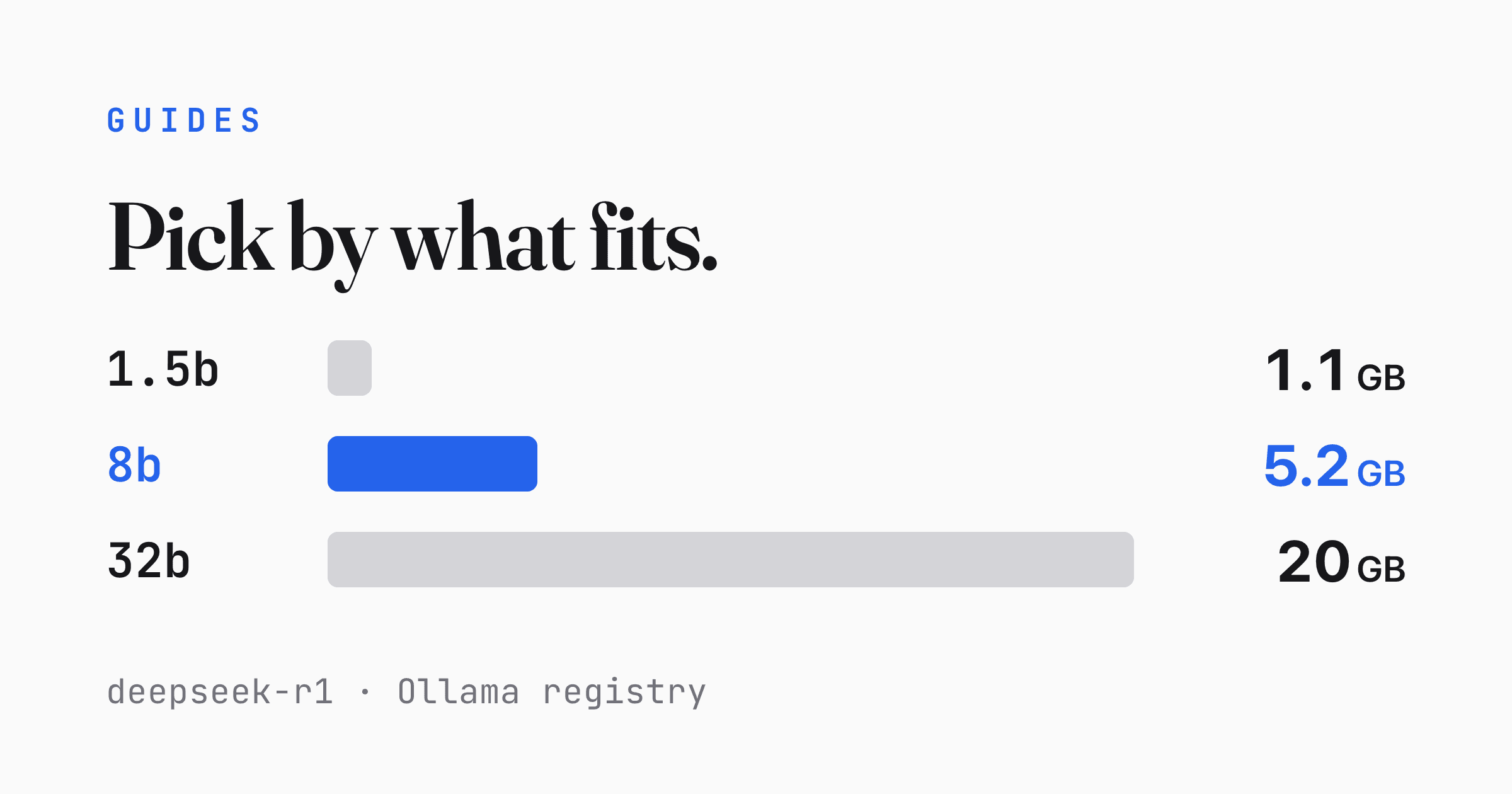
That's a 5.2 GB download. The tag after the colon is the size; deepseek-r1:latest is an alias for the 8B build, which is DeepSeek-R1-0528-Qwen3-8B — R1's reasoning distilled into a Qwen3 8B backbone. Sizes range from a 1.1 GB 1.5B model up to a 404 GB 671B one — pick based on your hardware, not your ambition.

Step 3: Run it and chat
ollama run deepseek-r1:8b
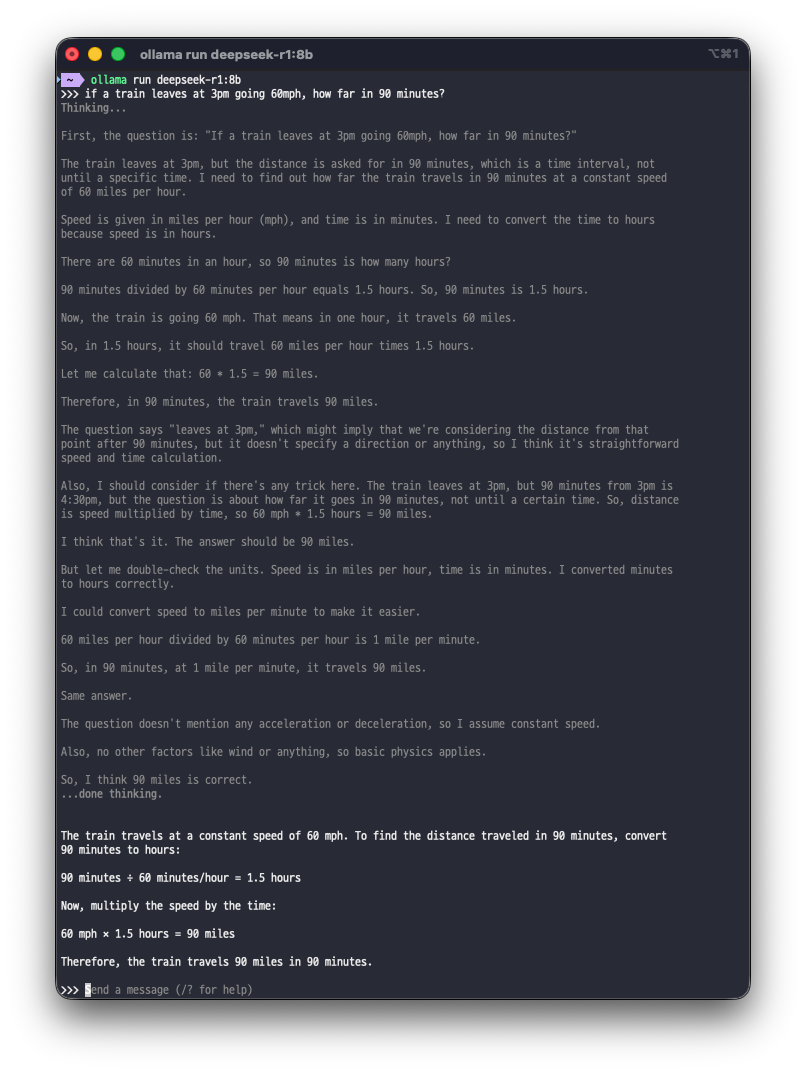
The first time you run a model it loads into memory, then you get a prompt. Type a question and you'll notice something unusual: before the actual answer, R1 works through the problem out loud. Ollama opens that stretch with Thinking..., closes it with ...done thinking., and puts the answer underneath. Expect the reasoning to run long — R1 will talk itself through even simple arithmetic, and it often reaches the right number several times over before committing to it.
Older guides show the model emitting raw <think>...</think> tags. That was the behaviour before Ollama added native thinking support — the CLI now separates reasoning from the answer for you, so you won't see literal tags.
If you only want the answer, you can turn the reasoning off:
ollama run deepseek-r1:8b --hidethinking "Is 9.9 bigger than 9.11?"
Inside an interactive session, /set nothink does the same thing and /set think turns it back on. Through the API the two come back as separate fields — thinking and content — so you never have to parse them apart yourself.
That reasoning is the model "showing its work," and it's genuinely useful for debugging answers. Type /bye to exit the chat.
Choosing the right model size
Every tag's download size and context window, straight from the Ollama library:
| Tag | Download | Parameters | Context | Rough VRAM |
|---|---|---|---|---|
deepseek-r1:1.5b |
1.1 GB | 1.5B | 128K | CPU / ~8 GB RAM |
deepseek-r1:7b |
4.7 GB | 7B | 128K | 6–8 GB |
deepseek-r1:8b (latest) |
5.2 GB | 8B | 128K | 6–8 GB |
deepseek-r1:14b |
9.0 GB | 14B | 128K | 8–12 GB |
deepseek-r1:32b |
20 GB | 32B | 128K | 16–24 GB |
deepseek-r1:70b |
43 GB | 70B | 128K | 40–48 GB |
deepseek-r1:671b |
404 GB | 671B | 160K | multi-GPU / server |
VRAM figures are guidance, not guarantees — throughput depends heavily on your exact GPU or CPU, so treat any tokens-per-second claim you read online as a ballpark.
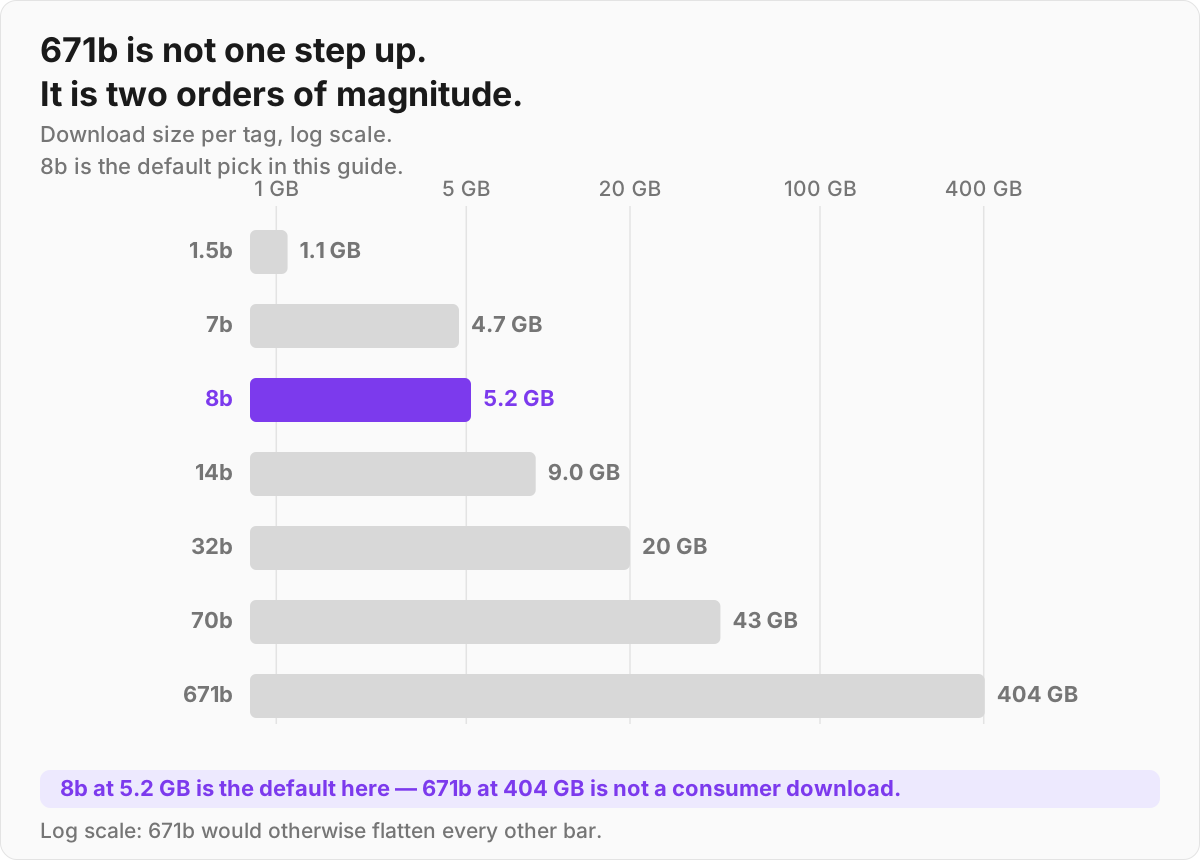

The one thing everyone gets wrong: only deepseek-r1:671b is the real, full DeepSeek-R1 — a 671-billion-parameter Mixture-of-Experts model. Every smaller tag is a distilled model: R1's reasoning baked into smaller Qwen and Llama backbones. They're good, and they punch above their size, but deepseek-r1:8b is not a shrunk-down 671B. It's a different, smaller model that learned to imitate R1's reasoning style.
Set your expectations accordingly — a local distill on consumer hardware won't match the hosted DeepSeek app.
R1 is the reasoning specialist. If you want a general-purpose or coding model instead, the same ollama pull works for the rest of the family:
| Model | Use case |
|---|---|
deepseek-r1 |
Reasoning, math, step-by-step |
deepseek-coder-v2:16b |
Code generation (8.9 GB) |
deepseek-v3:671b |
General-purpose MoE chat — 404 GB, server-class only |
One note on tags you may see in older guides: deepseek-v3.2 was retired from the Ollama library on July 15, 2026; DeepSeek's newer V4-Pro and V4-Flash are listed only as :cloud tags and cannot be pulled for local use.
Managing models
Models eat disk fast, so a few housekeeping commands matter:
ollama ls                # everything you've downloaded (ollama list still works)
ollama ps                # what's loaded in memory right now
ollama rm deepseek-r1:8b # delete a model to reclaim space
Where the files land depends on your platform: macOS uses ~/.ollama/models, Linux uses /usr/share/ollama/.ollama/models (the service runs as its own ollama user), and Windows uses %USERPROFILE%\.ollama\models. If you pull a few of the bigger tags, that directory grows into tens of gigabytes quickly — ollama ls is your friend.
Going beyond the CLI
The local server exposes a REST API on port 11434. A minimal generation request:
curl http://localhost:11434/api/generate -d '{
  "model": "deepseek-r1:8b",
  "prompt": "Why is the sky blue?",
  "stream": false
}'
/api/generate streams by default, returning a sequence of NDJSON objects; "stream": false collapses that into a single JSON response, which is easier to eyeball from the terminal.
There's also an OpenAI-compatible endpoint at http://localhost:11434/v1, so most tools and SDKs that already speak the OpenAI API can point at your local Ollama by changing the base URL. If you'd rather have a chat window than a terminal, install Open WebUI and point it at the same address.
If you ever set OLLAMA_HOST=0.0.0.0 to reach it from another machine, note that Ollama has no built-in authentication — put it behind a VPN or reverse proxy.
When it's slow or crashes
- Out of memory or painfully slow. Drop to a smaller tag (
32b→14b→8b). Ollama's default quantization is already memory-friendly; going smaller is usually faster than fighting your hardware. - GPU isn't being used. Run
ollama pswhile a model is loaded — it shows the CPU/GPU split. If it's all CPU, your GPU drivers or CUDA/ROCm setup likely aren't visible to Ollama; reinstalling the GPU driver and restarting the Ollama service usually fixes it. - Long prompts blow up memory. Ollama defaults to a 4096-token context window regardless of the 128K ceiling on the model card. Raising it (
num_ctx, orOLLAMA_CONTEXT_LENGTHon the server) is what costs memory — so raise it deliberately, only for the prompts that need it. - Keep it current. Re-run the installer (or the Linux curl script) to update; new versions ship real performance and hardware-support gains.
Once deepseek-r1:8b runs comfortably, the obvious next steps are trying a larger size if your GPU allows, and wiring the local API into an app via that /v1 endpoint — same code you'd write against a hosted model, just pointed at localhost.