If a uv project that used to install cleanly now stops with this, the cause is usually the Python version uv picked, not torch:
error: Distribution `torch==2.14.1 @ registry+https://pypi.org/simple` can't be installed because it doesn't have a source distribution or wheel for the current platform

hint: You're using CPython 3.15 (`cp315`), but `torch` (v2.14.1) only has wheels with the following Python ABI tags: `cp311`, `cp312`, `cp313`, `cp314`, `cp314t`
uv 0.13.0 (released 2026-10-09) made Python 3.15 the default version that uv downloads when nothing is pinned. Packages that don't ship cp315 wheels yet then either fail outright or, if they publish a source distribution, get compiled from source without any warning. This post covers the quick fix, the cause behind each error, and a few other uv 0.13 breaking changes that produce confusing errors. Every terminal block comes from a lab run on 2026-10-22, and each claim is marked as reproduced or not.
The error messages
The error text depends on which command you ran. All of these come from uv 0.13.5:
| Command | What you see |
|---|---|
uv add torch in a project created by uv 0.13 |
Because all versions of torch have no wheels with a matching Python version tag (e.g., `cp315`) ... |
uv sync on a fresh CI runner or container |
Distribution `torch==2.14.1 ...` can't be installed because it doesn't have a source distribution or wheel for the current platform |
uv pip install torch in a new uv venv |
Because all versions of torch have no wheels with a matching Python ABI tag (e.g., `cp315`) ... |
uv add pyyaml (no error at install time) |
Building pyyaml==6.0.3, then later ImportError: cannot import name 'CSafeLoader' from 'yaml' |
The last one doesn't fail at install time, so it is the hardest to spot. More on it below.
Quick fix
Pin the project to 3.14 and commit the pin:
uv python pin 3.14     # writes .python-version — commit this file
uv sync
For a one-off command, or for CI where you don't want to touch the repo:
uv sync --python 3.14
# or
UV_PYTHON=3.14 uv sync
Both override .python-version. In the lab, UV_PYTHON=3.15 uv sync --locked --dry-run used 3.15 even though the directory had a .python-version pinned to 3.14.
If the project was created with uv 0.13, the pin alone fails. On a machine with no Python installed, uv init records 3.15 in both .python-version and requires-python, so the 3.14 pin is rejected:
$ uv python pin 3.14
Downloading cpython-3.14.9-macos-aarch64-none (download) (25.5MiB)
 Downloaded cpython-3.14.9-macos-aarch64-none (download)
error: The requested Python version `3.14` is incompatible with the project `requires-python` value of `>=3.15`.
Edit requires-python in pyproject.toml first and set it to the oldest Python you support (the lab used >=3.11). Then pin:
$ grep requires-python pyproject.toml
requires-python = ">=3.11"
$ uv python pin 3.14
Updated `.python-version` from `3.15` -> `3.14`
$ uv add torch --no-sync
Using CPython 3.14.9
Resolved 31 packages in 270ms
For new projects, avoid the problem from the start with uv init --python 3.14. If you're new to uv projects, the uv virtual environment guide covers the basics. That writes 3.14 to .python-version and requires-python = ">=3.14".
For uvx and uv tool, a project pin doesn't apply (see Tools ignore the project pin). Pass --python 3.14, or set a user-level pin with uv python pin --global 3.14.
What changed in uv 0.13.0
The 0.13.0 release notes list it as the first breaking change:
The default stable Python version has changed from 3.14 to 3.15. This affects Python downloads when no version is requested or pinned, e.g., when running
uv python install.uv continues to use compatible Python installations that are already present. For example,
uv venvcan still use an installed Python 3.14. If no suitable interpreter is installed and automatic downloads are enabled, commands such asuv venvanduvx pythoncan now download Python 3.15.
For context, Python 3.15.0 was released the same day, 2026-10-09. Python 3.15.1, "an expedited security release", followed on 2026-10-21. uv 0.13.5 ships managed builds of 3.15.1. To see what 3.15 offers, read measured startup savings from lazy imports.
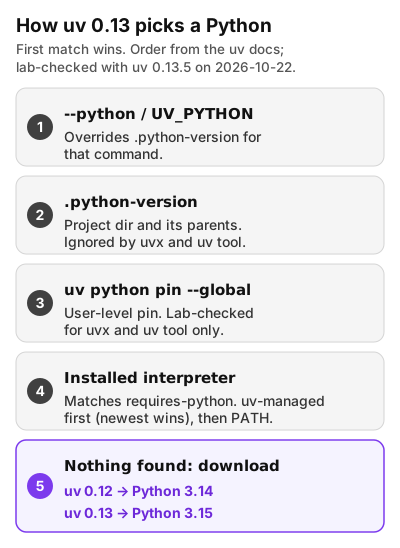
So uv 0.13 doesn't replace an interpreter you already have. You end up on 3.15 in four situations, and the lab reproduced each one:
- A machine with no Python on it, such as a fresh CI runner image, a slim container, or a new laptop. uv 0.12.24 downloaded
cpython-3.14.8here. uv 0.13.5 downloadedcpython-3.15.1. - 3.15 is installed as a uv-managed Python alongside older versions. The uv docs say that "When searching for a managed Python version, uv will prefer newer versions first." With managed 3.14.9 and 3.15.1 both installed and no pin,
uv syncchose 3.15.1. uv initon such a machine. The new project gets.python-version=3.15andrequires-python = ">=3.15". If it's a library, that metadata blocks installs on every Python older than 3.15.uvx pythonand tools.uvx python --versionprintedPython 3.15.1. Managed 3.14.9 was also installed at that point, so this is the newest-managed rule from case 2, not a fresh download. On a machine with no Python, the release notes sayuvx pythondownloads 3.15.
A system Python on PATH is also used before anything is downloaded. In one run with uv 0.12.24, /usr/bin/python3 was on PATH. uv reported Using CPython 3.9.6 interpreter at: /Applications/Xcode.app/Contents/Developer/usr/bin/python3, and uv init wrote requires-python = ">=3.9". I didn't repeat that run with 0.13.5. The 0.13.0 notes say compatible installed interpreters are still used.
This is what a fresh-machine run of an existing project looks like. The project has requires-python = ">=3.11" and a uv.lock with torch, but no committed .python-version:
$ ls -a
.
..
README.md
pyproject.toml
src
uv.lock
$ grep requires-python pyproject.toml
requires-python = ">=3.11"
$ uv python list --only-installed
$ uv sync --locked
Downloading cpython-3.15.1-macos-aarch64-none (download) (26.5MiB)
 Downloaded cpython-3.15.1-macos-aarch64-none (download)
Using CPython 3.15.1
Creating virtual environment at: .venv
Resolved 31 packages in 0.62ms
error: Distribution `torch==2.14.1 @ registry+https://pypi.org/simple` can't be installed because it doesn't have a source distribution or wheel for the current platform

hint: You're using CPython 3.15 (`cp315`), but `torch` (v2.14.1) only has wheels with the following Python ABI tags: `cp311`, `cp312`, `cp313`, `cp314`, `cp314t`
The lockfile was valid. uv lock succeeded with requires-python = ">=3.11" even though torch has no 3.15 wheel. A valid lock therefore doesn't guarantee the project installs on every Python in that range.
Causes, most common first
1. The package has no cp315 wheel and no source distribution
The install fails outright. It is the torch case, and it applies to most of the large ML binaries. Torch doesn't publish source distributions on PyPI: the PyPI JSON API lists no sdist in any of the 51 torch releases it returns. When the wheel is missing, uv has nothing to fall back to, so you get an error rather than a build.
As of the 2026-10-22 check, PyPI's newest torch is 2.14.1, with wheels for cp310 through cp314 and cp314t. PyTorch's 2.15 key-dates post says "GA is Oct 28, 2026". The Python 3.10 removal notice lists 3.15 / 3.15t as "Retained" in its "Status after 2.15" table. The 2.15.0 release candidate already has torch-2.15.0-cp315-cp315-macosx_14_0_arm64.whl on PyTorch's own test wheel index (download.pytorch.org/whl/test/cpu, checked 2026-10-22 03:14 UTC), not on PyPI. That index exists for testing release candidates. For anything that matters, pin to 3.14 until 2.15 is on PyPI.
2. The package has a source distribution but no cp315 wheel
This case is quieter. uv builds the sdist automatically, and if a C compiler is available the build often "succeeds". PyYAML 6.0.3 had no cp315 wheels when I checked:
$ cat .python-version
3.15
$ cap 120 uv add pyyaml
Using CPython 3.15.1
Creating virtual environment at: .venv
Resolved 2 packages in 498ms
   Building yamlapp @ file://~/lab/work/yamlapp
      Built yamlapp @ file://~/lab/work/yamlapp
   Building pyyaml==6.0.3
      Built pyyaml==6.0.3
Prepared 2 packages in 12.86s
Installed 2 packages in 1ms
 + pyyaml==6.0.3
 + yamlapp==0.1.0 (from file://~/lab/work/yamlapp)
$ uv run python -c "import yaml; print(yaml.__version__, yaml.__with_libyaml__)"
6.0.3 False
$ uv run python -c "from yaml import CSafeLoader"
Traceback (most recent call last):
  File "<string>", line 1, in <module>
    from yaml import CSafeLoader
ImportError: cannot import name 'CSafeLoader' from 'yaml' (~/lab/work/yamlapp/.venv/lib/python3.15/site-packages/yaml/__init__.py). Did you mean: 'SafeLoader'?
(cap 120 is a 120-second time limit I put on builds in the lab. It is not part of uv.)
The verbose build log shows why. The machine has no LibYAML headers, so PyYAML's build gave up on its C extension and installed the pure-Python version:
DEBUG yaml/_yaml.h:2:10: fatal error: 'yaml.h' file not found
DEBUG     2 | #include <yaml.h>
DEBUG       |          ^~~~~~~~
DEBUG 1 error generated.
DEBUG Error compiling module, falling back to pure Python
On 3.14, the same uv add pyyaml installs the prebuilt wheel, which reports 6.0.3 True and imports CSafeLoader without error. On 3.15 you get no install error. Instead, code that uses yaml.CSafeLoader fails at runtime, and code that falls back to yaml.SafeLoader runs the slower pure-Python parser. If an import fails because the package isn't installed in the active environment at all, see Fix ModuleNotFoundError in Python.
You can also hit this without depending on PyYAML yourself. A wheel-only dry run of tokenizers on 3.15 failed even though tokenizers ships a compatible abi3 wheel. The reason was huggingface-hub, which depends on pyyaml>=5.1, as the resolver output shows:
cause: Because pyyaml>=5.1 has no usable wheels and all of:
Some sdist builds fail outright instead: no compiler in a slim image, missing system headers, or a Rust toolchain the build expects. I did not reproduce a hard compile failure. This Mac has the Xcode command-line compiler, and I chose not to start large builds.
3. The project itself was scaffolded for 3.15
See Quick fix. A requires-python = ">=3.15" written by uv init rejects any 3.14 pin, and a library published with it excludes users on 3.14 and older.
4. Tools and scripts follow different rules than projects
This catches people who pinned the project and still see 3.15 from uvx. The details are in the next section.
Fixes in detail
Pin projects with .python-version
uv python pin 3.14 writes .python-version. uv searches for that file in the working directory and its parents. Commit it, because a pin that lives only on your laptop doesn't help CI. Per the docs, a bare uv python install "will install the Python version listed in the file" when a .python-version exists. Without one, it installs the new default, which is 3.15.
To find out which interpreter a project will use before anything breaks:
$ uv python find
~/lab/pythons-ci/cpython-3.14-macos-aarch64-none/bin/python3.14
uv python find takes the request as a positional argument (uv python find 3.15). In my run it did not read UV_PYTHON, so don't use it to check that variable.
Capping requires-python works, with a cost
With requires-python = ">=3.11,<3.15" and no pin, a fresh machine downloaded 3.14 instead:
$ uv lock
Downloading cpython-3.14.9-macos-aarch64-none (download) (25.5MiB)
 Downloaded cpython-3.14.9-macos-aarch64-none (download)
Using CPython 3.14.9
Resolved 31 packages in 4ms
For an application you deploy yourself, that's acceptable. For a library, the upper bound blocks installs on 3.15 for every user, long after your dependencies catch up. Prefer .python-version in that case.
CI: set UV_PYTHON or commit the pin
uv's GitHub Actions guide says: "If not using the setup-uv action, you can set the UV_PYTHON environment variable". UV_PYTHON is documented as "Equivalent to the --python command-line argument."
env:
  UV_PYTHON: "3.14"
To stop CI from downloading an interpreter at all, set UV_PYTHON_DOWNLOADS=never or pass --no-python-downloads. A runner without a matching Python then fails immediately instead of picking up 3.15:
$ UV_PYTHON_DOWNLOADS=never uv sync --locked
error: No interpreter found for Python >=3.11 in managed installations or search path

hint: A managed Python download is available for Python >=3.11, but Python downloads are set to 'never'
Turn silent source builds into errors
If a source build in CI would be a surprise, make it an error:
[tool.uv]
no-build = true
In the lab, uv add pyyaml then failed on 3.15, while uv add pycowsay, a pure-Python wheel, and building the project itself still worked. uv's environment-variable reference says the same about --no-build: "First-party packages, such as projects in the workspace, will still be built." Use no-build-package = ["pyyaml"] (or --no-build-package pyyaml) to limit the rule to specific packages. For the pip interface, use uv pip install --only-binary :all: .... For how uv pip relates to project commands like uv add, see uv vs pip vs Poetry.
The resulting error is long, and it can point at unrelated old releases (pyyaml==5.1b7 ... cp27m). Read the hint: lines at the bottom:
hint: Wheels are required for `pyyaml` because building from source is disabled for all packages (i.e., with `--no-build`)

hint: You require CPython 3.15 (`cp315`), but we only found wheels for `pyyaml` (v5.1b7) with the following Python implementation tag: `cp27`
Tools ignore the project pin
The tools docs say a tool environment "will ignore non-global Python version requests like .python-version files and the requires-python value from a pyproject.toml." The lab confirms it. In a directory pinned to 3.14, with uv-managed 3.14.9 and 3.15.1 both installed:
$ cat .python-version
3.14
$ uv tool uninstall pycowsay
Uninstalled 1 executable: pycowsay
$ uv tool install pycowsay
Resolved 1 package in 0.72ms
Installed 1 package in 2ms
 + pycowsay==0.0.0.2
Installed 1 executable: pycowsay
$ ~/lab/tools/pycowsay/bin/python -c 'import sys; print(sys.version.split()[0])'
3.15.1
$ uvx --isolated --from pycowsay python -c "import sys; print(sys.version.split()[0])"
3.15.1
(The uv tool install output also had a warning: line about the lab's tool bin directory not being on PATH. That's specific to the lab setup, so I removed it here.)
Two things worked. --python 3.14 on uvx / uv tool install gave 3.14.9, and so did a global pin (uv python pin --global 3.14) in a directory with no local pin. Use --isolated when you check this: in one run, a plain uvx reused a cached 3.14 environment from an earlier uvx --python 3.14 call and printed 3.14.9 without any pin.
Scripts respect .python-version
uv run script.py with inline metadata (requires-python = ">=3.11") picked 3.15.1 with no pin and 3.14.9 after uv python pin 3.14 in the same directory. Both versions were already installed as uv-managed, so the 3.15.1 result is the newest-managed rule, not a download. uv run --python 3.14 script.py works too.
Wheel availability snapshot
I checked the latest release of each package through the PyPI JSON API on 2026-10-22, 03:12–03:14 UTC, and then ran a wheel-only dry-run install (uv pip install --dry-run --only-binary :all:) on CPython 3.15.1 on macOS arm64. This is a snapshot, so re-check before relying on it.
| Package (latest on PyPI) | cp315 wheels | sdist | Wheel-only on 3.15, macOS arm64 |
|---|---|---|---|
| torch 2.14.1 | no | no | fails |
| torchvision 0.29.1 | no | no | fails |
| onnxruntime 1.31.0 | no | no | fails |
| tensorflow 2.21.0 | no | no | fails |
| pyyaml 6.0.3 | no | yes | fails; by default uv tries a source build |
| zstandard 0.25.0 | no | yes | fails; by default uv tries a source build |
| lz4 4.4.5 | no | yes | fails; by default uv tries a source build |
| h5py 3.16.0 | no | yes | fails; by default uv tries a source build |
| tokenizers 0.23.3 | abi3 only | yes | fails, via huggingface-hub → pyyaml |
| safetensors 0.8.0 | abi3 only | yes | works |
| numpy 2.5.4 | yes | yes | works |
| pandas 3.0.6 | yes | yes | works |
| scipy 1.18.1 | yes | yes | works |
| pydantic-core 2.50.1 | yes | yes | works |
| cryptography 50.0.2 | yes | yes | works |
| pyarrow 26.0.0 | yes | yes | works |
Most of the scientific Python stack already ships cp315 wheels. The gaps are the large ML runtimes, which have no sdist and so fail hard, and older C-extension packages that have an sdist and so build silently.
Other uv 0.13 breaking changes that cause confusing errors
--require-hashes inside a -c constraints file (reproduced)
From the 0.13.0 notes: "Previously, uv ignored --require-hashes in constraints files included with -c from a requirements file. Now, uv honors the directive". The same files on two versions:
$ cat requirements.txt
-c constraints.txt
pycowsay==0.0.0.2
$ cat constraints.txt
--require-hashes
$ uv pip install --dry-run -r requirements.txt
error: In `--require-hashes` mode, all requirements must have a hash, but none were provided for: pycowsay==0.0.0.2
uv 0.12.24 printed Would install 1 package for the same command. Fix it by adding --hash=sha256:... lines to the requirements, which made the dry run pass on 0.13.5, or by removing the directive if you never meant to check hashes. The notes say: "You cannot opt out while the directive is present."
Editable requirements in a constraints file (reproduced)
0.12.24 silently ignored -e ../yamlapp2 in a constraints file. 0.13.5 rejects it:
error: Editable requirements are not allowed as constraints in `constraints-editable.txt`
Move the editable requirement to a -r requirements file or pass it with --editable.
tar-codec rejects sdists with hard links (reproduced on 0.13.0, fixed in 0.13.1)
0.13.0 switched tar extraction to tar-codec. The release notes warn that "uv may now reject archives containing hard links or unsupported tar extensions that previous versions accepted." I built a minimal sdist with one hard-link member. uv 0.13.0 refused it:
$ uv pip install --no-cache ./hlpkg-0.1.0.tar.gz
error: Failed to build `hlpkg @ file://~/lab/work/tardemo/hlpkg-0.1.0.tar.gz`
  cause: Failed to extract archive: hlpkg @ file://~/lab/work/tardemo/hlpkg-0.1.0.tar.gz
  cause: Invalid tar file
  cause: at byte 5120: extraction policy rejected input: hard-link members are not allowed
With UV_LEGACY_TAR_BACKEND=1, 0.13.0 installed it. uv 0.13.5 installed it without the variable, matching the 0.13.1 changelog entry "Restore support for source distributions containing hard links or full-length tar user or group names (#22516, #22522)". If you see this error, upgrade past 0.13.0. "Unsupported tar extensions" was not reproduced.
Cache format change (not an error, but expect re-downloads)
The notes say the release "updates the format of many of uv's cache entries" and that "uv may download or rebuild dependencies after upgrading". With the same install on an empty cache, 0.12.24 created sdists-v9 simple-v25 wheels-v6 and 0.13.5 created sdists-v10 simple-v27 wheels-v7. If CI caches the uv cache, the first 0.13 run will be slower and the cache will grow. Running uv cache prune with 0.13.5 removed the old buckets in the lab (Removed 115 files (384.0KiB)).
Listed in the notes, not reproduced here
- On Windows ARM64, uv now prefers native ARM64 Python over emulated x86_64. Opt out with
UV_PYTHON_ARCH=x86_64. Not tested (no Windows machine). -c "a.txt b.txt"is now treated as a single path. Repeat-cfor each file instead.uv build --clearnow rejects output directories that contain the build source.- New virtual environments on Python 3.10+ no longer get the
_virtualenv.pydistutils patch.
How I reproduced this
- Date: 2026-10-22, between 03:10 and 03:25 UTC.
- Machine: macOS 26.7.1 (build 25G241) on an Apple M5 (
arm64). - uv: 0.13.5 (
46776a95d 2026-10-21), 0.13.0 (4ecd0eff2 2026-10-09), and 0.12.24 (5411378eb 2026-10-08). I fetched each withuvx --from uv@<version>into a separate cache and called the binary by path. The uv installed on the machine (0.11.24) was not upgraded or used for the lab. - Pythons: uv-managed CPython 3.15.1, 3.14.9, and 3.14.8, all downloaded by uv.
/usr/bin/python3(which resolves to Xcode's Python 3.9.6) was hidden fromPATHfor the "fresh machine" runs. The one exception is the uv 0.12.24 run described above. - Isolation: every step ran under
env -i, withHOME,TMPDIR,UV_CACHE_DIR,UV_PYTHON_INSTALL_DIR,UV_PYTHON_BIN_DIR,UV_TOOL_DIR, andUV_TOOL_BIN_DIRall inside a scratch directory, so user config, global pins, and the real~/.local/binwere not involved. - Torch was never downloaded. The working "after" path for torch uses
uv add --no-syncanduv sync --dry-run. The real working install was done with PyYAML. - No benchmarks. Durations that appear inside uv's own output are incidental and were not measured.
- Terminal output is copied from the lab transcripts. The only edits: the scratch directory prefix is shortened to
~/lab, some excerpts start or end mid-transcript, and the one lab-specificwarning:line noted above is removed.
References
- uv 0.13.0 release notes: https://github.com/astral-sh/uv/releases/tag/0.13.0
- uv 0.13.1 release notes (tar hard-link fix): https://github.com/astral-sh/uv/releases/tag/0.13.1
- uv 0.13.5 release notes (CPython 3.15.1 builds): https://github.com/astral-sh/uv/releases/tag/0.13.5
- uv docs, Python versions (requests,
.python-version, discovery, downloads): https://docs.astral.sh/uv/concepts/python-versions/ - uv docs, Tools (Python version handling): https://docs.astral.sh/uv/concepts/tools/#python-versions
- uv docs, Running scripts: https://docs.astral.sh/uv/guides/scripts/
- uv docs, GitHub Actions integration: https://docs.astral.sh/uv/guides/integration/github/
- uv docs, Caching (versioning,
uv cache prune): https://docs.astral.sh/uv/concepts/cache/ - uv environment variables (
UV_PYTHON,UV_NO_BUILD,UV_LEGACY_TAR_BACKEND): https://docs.astral.sh/uv/reference/environment/ - Python 3.15.0 release page: https://www.python.org/downloads/release/python-3150/
- Python 3.15.1 release page: https://www.python.org/downloads/release/python-3151/
- PyTorch 2.15 key dates: https://dev-discuss.pytorch.org/t/pytorch-release-2-15-key-dates/3434
- PyTorch 2.15 RC1 announcement: https://dev-discuss.pytorch.org/t/pytorch-2-15-rc1-produced-for-pytorch-torchvision-torchaudio/3464
- PyTorch notice on Python version support in 2.15: https://dev-discuss.pytorch.org/t/notice-python-3-10-support-is-being-removed-from-pytorch-2-15-2-14-is-the-last-release-with-3-10-wheels/3440
- PyPI JSON API (wheel availability): https://pypi.org/pypi/torch/json, https://pypi.org/pypi/pyyaml/json