torch.cuda.OutOfMemoryError: CUDA out of memory is one of those errors that lies to you. You'll see it fire while nvidia-smi still reports a few gigabytes free, and your first instinct — "I just need a bigger GPU" — is often wrong. PyTorch doesn't hand memory straight back to the driver. It runs a caching allocator, so the number that actually decides whether your allocation succeeds isn't total free VRAM. It's whether the allocator can find a single contiguous block big enough.
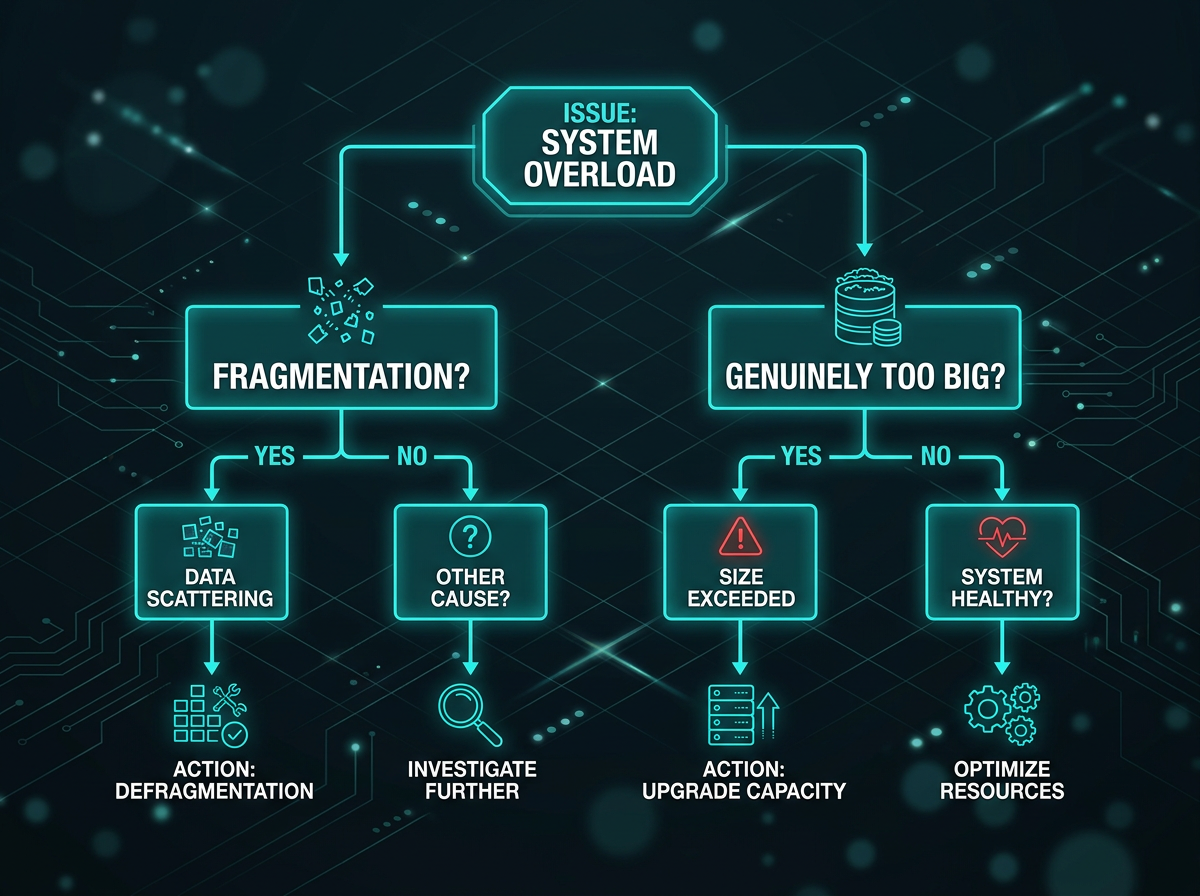
That distinction splits every OOM into one of two problems:
- You genuinely need more memory than you have. Model weights + activations + optimizer state + batch exceed VRAM. No trick changes physics here; you have to use less.
- Fragmentation. Enough free memory exists, but it's scattered across non-contiguous blocks, so a large request fails anyway. The tell is in the error itself:
reservedis much larger thanallocated.
The fix path is different for each, so read the error before you start randomly lowering batch sizes.
Read the error message first
The standard message looks like this:
torch.cuda.OutOfMemoryError: CUDA out of memory. Tried to allocate 2.00 GiB
(GPU 0; 24.00 GiB total capacity; 19.40 GiB already allocated;
512.00 MiB free; 22.10 GiB reserved in total by PyTorch)
Two numbers matter. allocated is memory held by live tensors. reserved is what PyTorch grabbed from the driver and is now caching for reuse. You can print them yourself:
import torch
print(f"allocated: {torch.cuda.memory_allocated() / 1e9:.2f} GB")
print(f"reserved:  {torch.cuda.memory_reserved() / 1e9:.2f} GB")
print(torch.cuda.memory_summary())   # full breakdown
The decision rule is simple. If reserved sits far above allocated — say 22 GiB reserved against 12 GiB allocated — the memory is there but fragmented; jump to the fragmentation section. If reserved and allocated are close and both near your card's capacity, you genuinely need to use less. Start with the fast fixes.
Fastest fixes, in order
Try these top to bottom. The first one solves most cases.
Lower the batch size. It's the single highest-leverage knob, and activation memory scales roughly linearly with it. Halve it and re-run before doing anything cleverer.
Wrap inference and evaluation in torch.inference_mode(). If you're computing predictions, validating, or running generation, you don't need the autograd graph — and keeping it pins every intermediate activation in memory. inference_mode() is the modern replacement for no_grad(): it's stricter and faster, so prefer it unless you later need those tensors in an autograd computation.
model.eval()
with torch.inference_mode():
    preds = model(batch)
Note that model.eval() alone does not disable gradient tracking — it only flips layers like dropout and batchnorm. You still need the context manager.
Don't accumulate tensors that carry graph history. This is the classic OOM that grows over time. Summing the raw loss tensor into a running total keeps the entire computation graph alive across iterations:
running_loss += loss          # wrong: holds the graph, leaks every step
running_loss += loss.item()   # right: pulls out a plain Python float
Same rule for any list you append GPU tensors to for later logging — call .detach() (or .item() / .cpu()) first.
del big intermediates and clear the cache between phases. Going from training to evaluation in the same process is a common spot to free things up:
del optimizer, train_outputs
torch.cuda.empty_cache()
One caveat people miss: empty_cache() only returns cached (reserved-but-unused) blocks to the driver. It does nothing for live tensors, and calling it inside your training loop just forces PyTorch to re-request memory it was about to reuse, which costs throughput. Use it at phase boundaries, not every step.
Fit a bigger model without buying a GPU
When you've trimmed the obvious waste and still don't fit, reach for techniques that change the memory/compute trade-off. They compose — you can stack mixed precision, accumulation, and checkpointing together.
| Technique | What it trades | When to reach for it |
|---|---|---|
| Lower batch size | Throughput, noisier gradients | First thing, always |
| Mixed precision (AMP) | Small fp16 numerical risk | Almost always worth it on modern GPUs |
| Gradient accumulation | Wall-clock time | Need a large effective batch |
| Gradient checkpointing | ~1 extra forward pass | Deep, activation-bound models |
| 8-bit optimizer / offload / ZeRO | Complexity, some speed | Optimizer state or weights don't fit |
Gradient accumulation simulates a large batch by summing gradients over several micro-batches before stepping:
accum_steps = 4
optimizer.zero_grad()
for i, (x, y) in enumerate(loader):
    loss = loss_fn(model(x), y) / accum_steps
    loss.backward()
    if (i + 1) % accum_steps == 0:
        optimizer.step()
        optimizer.zero_grad()
Automatic Mixed Precision (AMP) runs most ops in fp16 or bf16, which cuts activation memory and speeds up Tensor Core math. Exact savings depend on the model, but it's usually the cheapest large win after batch size:
scaler = torch.amp.GradScaler("cuda")
for x, y in loader:
    optimizer.zero_grad()
    with torch.autocast("cuda", dtype=torch.bfloat16):
        loss = loss_fn(model(x), y)
    scaler.scale(loss).backward()
    scaler.step(optimizer)
    scaler.update()
With bfloat16 you can often skip the GradScaler entirely; it mainly exists to keep float16 gradients from underflowing.
Gradient (activation) checkpointing stores only a subset of activations during the forward pass and recomputes the rest during backward. You pay roughly one extra forward pass in exchange for a big drop in activation memory — worth it for deep transformers:
from torch.utils.checkpoint import checkpoint
out = checkpoint(my_block, x, use_reentrant=False)
If the optimizer state or the weights themselves are what blow up, look at 8-bit optimizers (bitsandbytes), CPU offload, or sharding the state across GPUs with FSDP or DeepSpeed ZeRO. Those are their own rabbit holes, but they're the right tools when a single device can't hold the full state.

Fragmentation: free memory that you still can't use
If your error shows reserved towering over allocated, you're fighting the allocator, not your model size. Each cudaMalloc returns an independent segment that can never merge with another, so a workload that allocates and frees blocks of varying sizes ends up with free memory chopped into pieces too small to satisfy a big request.
The modern fix is expandable_segments. Instead of grabbing fixed segments, the allocator reserves a virtual address range and maps physical memory as the segment grows, which lets it expand rather than fragment. Set it before your process starts:
PYTORCH_CUDA_ALLOC_CONF=expandable_segments:True python train.py
It's still opt-in in current PyTorch, not the default. One reported torchtune case (A100 80GB) saw peak usage drop from 16.39 GiB to 10.83 GiB — about a third — just by flipping this on, with no speed penalty. Your mileage will vary, but it's a one-line thing to try and it costs nothing to test.
PYTORCH_CUDA_ALLOC_CONF key |
Purpose | Status |
|---|---|---|
expandable_segments:True |
Segments grow instead of fragmenting | Recommended, opt-in |
max_split_size_mb:N |
Cap block splitting to limit fragmentation | Older knob, largely superseded |
garbage_collection_threshold:0.8 |
Reclaim cached blocks proactively above a fill ratio | Situational |
max_split_size_mb predates expandable_segments and was the old way to tame fragmentation by stopping the allocator from carving large blocks into unreclaimable small ones. Try expandable_segments first; reach for max_split_size_mb only if the newer option doesn't help or isn't available in your build.
Find the real leak
If memory climbs steadily across epochs until it OOMs, that's not fragmentation — it's a leak, and clearing the cache won't save you. Log allocated memory per step and watch the trend:
if step % 50 == 0:
    print(f"step {step}: {torch.cuda.memory_allocated() / 1e9:.2f} GB")
A monotonic climb points at references you're not releasing: loss tensors retained with their graph, lists of GPU tensors that keep growing, forward hooks holding onto outputs, or anything stored without .detach().
To see exactly what's alive and where it was allocated, record a memory history and inspect the snapshot:
torch.cuda.memory._record_memory_history(max_entries=100_000)
# ... run the workload that leaks ...
torch.cuda.memory._dump_snapshot("snapshot.pickle")
Drag the resulting .pickle into the visualizer at pytorch.org/memory_viz — it renders allocations over time, right in the browser, so you can trace a growing band back to the line that created it.
TL;DR checklist
When the error hits, work down this list:
- Read
reservedvsallocated— fragmentation or genuinely full? - Lower the batch size.
- Wrap inference and eval in
torch.inference_mode(). - Stop accumulating graph-carrying tensors (
.item()/.detach()your logs). - Turn on AMP (
torch.autocast). - Add gradient accumulation for a larger effective batch.
- Add gradient checkpointing for deep models.
- Set
PYTORCH_CUDA_ALLOC_CONF=expandable_segments:Truefor fragmentation. - Still climbing over epochs? Profile with the memory snapshot tool and hunt the leak.